


Search engines are the gateways to the wild and wonderful world of websites.
From mega-giants that turned their brand name into a verb, to small engines built for one language, one country or one cause, search engines come in all sizes and functions.
If you’re here, you’re probably curious about what other options there are, or maybe you’re looking to make a new engine your go-to guy.
We reviewed 50 search engines in detail, with fresh 2026 data, their most interesting features, pros and cons, privacy notes and the official SEO documentation for each one.
In this comprehensive article, we will take a look at:
- Search engines list
- What is a search engine?
- How do search engines work?
- Types of search engines
- History of search engines
- Search engine market share
- 50 most popular search engines
- AI vs. search engines
- How to optimize a website for search engines
- Frequently asked questions
TL;DR
- Google is still the world’s #1 search engine, with 89.94% of the market in September 2026 (StatCounter). Bing is a distant second with 5.29%, followed by Yahoo!, Yandex, DuckDuckGo and Baidu.
- Every search engine works in three steps: it crawls the web, indexes pages and ranks them. Most big engines now also write AI answers on top of their results.
- The best alternative depends on what you want: Bing for a full-featured switch, DuckDuckGo, Brave Search or Startpage for privacy, Perplexity or ChatGPT Search for AI research, and Ecosia if you’d like your searches to fund tree planting.
- Some countries have strong local engines. Baidu leads in China, Yandex in Russia, and Naver goes head-to-head with Google in South Korea.
- AI isn’t replacing search engines. Google’s AI Overviews reach more than 2.5 billion people a month, and most people use AI chatbots alongside classic search.
- For website owners, the job is the same in classic and AI search: get crawled, indexed, ranked and cited. Google Search Console and Bing Webmaster Tools now both report your visibility in AI answers.
Search engines list | ||||
|---|---|---|---|---|
| 1.Google | 2.Microsoft Bing | 3.Yahoo! | 4.Yandex | 5.DuckDuckGo |
| 6.Baidu | 7.ChatGPT Search | 8.Perplexity | 9.Brave Search | 10.Naver |
| 11.Ecosia | 12.Startpage | 13.Kagi | 14.Qwant | 15.Mojeek |
| 16.Swisscows | 17.Seznam | 18.Sogou | 19.360 Search (Haosou) | 20.Shenma |
| 21.Cốc Cốc | 22.Petal Search | 23.AOL | 24.You.com | 25.WolframAlpha |
| 26.Internet Archive | 27.Openverse | 28.Dogpile | 29.MetaCrawler | 30.Presearch |
| 31.MetaGer | 32.SearXNG | 33.KARMA Search | 34.Yep | 35.Microsoft Copilot |
| 36.Google Gemini | 37.Yahoo! Japan | 38.Daum | 39.Rambler | 40.Lycos |
| 41.WebCrawler | 42.Google Scholar | 43.Semantic Scholar | 44.PubMed | 45.Consensus |
| 46.Andi | 47.Marginalia Search | 48.YaCy | 49.Kiddle | 50.OceanHero |
What is a search engine?
A search engine is a software system that discovers, stores and ranks information from the web (or from a specific database) and shows the most relevant results for the words, question or image you type in.
The page with those results is called the search engine results page (SERP).
A 2026 results page can contain AI-generated answers, maps, images, videos, shopping results, ads and “People Also Ask” boxes, along with the classic blue links.
Google, Microsoft Bing, Yahoo!, DuckDuckGo, Baidu and Yandex are the best-known examples. AI tools like ChatGPT Search and Perplexity work as search engines too: they search the web in real time and write an answer with links to their sources.
How do search engines work?
Search engines work in three stages: they crawl the web to discover pages, index (store and understand) them, and rank and serve the best matches when someone searches. This is also how Google describes it in its official in-depth guide to how Google Search works.
- Crawling
- Indexing
- Ranking and serving
1. Crawling
Crawling is the process during which the search engine discovers new and updated web pages using automated programs called crawlers, bots or spiders (Google’s is Googlebot, Bing’s is Bingbot).
Here’s a simplified breakdown of how it works:
- Seed URLs: The process starts with a list of known URLs, including those from previous crawls and submitted XML sitemaps.
- Fetch pages: The crawler downloads the content of these URLs, respecting the rules in the site’s robots.txt file.
- Render: Modern crawlers run the page’s JavaScript to see it the way a browser would.
- Extract links: The crawler identifies all hyperlinks on the page.
- Queue new URLs: Newly found links are added to the list of pages to visit. Dofollow links are followed, while Google treats nofollow links as a hint rather than a strict rule.
This process repeats continuously, so search engines keep finding new pages and revisiting old ones.
2. Indexing
Indexing is the process of analyzing and storing the content of crawled pages in the search engine’s database, called the “Index”.
The index works as a vast library. Google says its index contains hundreds of billions of web pages and is well over 100,000,000 gigabytes in size.
Still, not every crawled page makes it in: search engines skip duplicates, thin content and pages blocked with a noindex tag.
During indexing, the search engine reads the text, titles, images, videos and structured data, and picks a canonical version when several URLs show the same content.
Generally speaking, your page has to be indexed first in order to be displayed on the SERP.
Keep in mind that both crawling and indexing are continuous processes that take place over and over again to keep the database fresh and relevant.
3. Ranking and serving
The last step is picking the best results for a query and building the results page.
This is like a librarian combing through books and choosing the ones with the most accurate and relevant information, with no damage or missing pages.
Every search engine uses many SEO ranking factors, many of which are kept secret to prevent manipulation. The results also depend on context, like your location, language and device. That’s why someone searching “pizza” in New York sees different results than someone in Bratislava.
As Martin Splitt from Google explained:
“We have over 200 signals to do so. So we look at things like the title, the meta description, the actual content that you’ve got on your page, images, links, all sorts of things.”
Martin Splitt, Google
In 2026, serving often includes one more step: generating an AI answer. Google’s AI Overviews and AI Mode, Bing’s Copilot and engines like Perplexity break a question into several related searches (Google calls this “query fan-out”), read the top results and write a summary with links to the sources.
With the basics down, it’s time to go deeper into how ranking and search algorithms work, because it’s a lot more complicated than browsing through a library.
What is a search engine algorithm?
The term “search engine algorithm” refers to a complex system of many algorithms that analyze indexed pages and decide which ones should appear, and in what order, for a specific query.
For example, Google says its algorithms look at five main areas when ranking results (it also describes each of its individual ranking systems in Search Central):
- Meaning of the query: First, the engine works out what you actually want, even if you misspell words or use synonyms, and what the search intent behind the query is.
- Relevance of the content: The algorithm checks how closely a page answers the query. For example, if you look for “dog grooming near me”, you don’t need a page about hypoallergenic dogs.
- Quality of the content: Next is the quality of the information itself, based on signals of expertise, authoritativeness and trustworthiness. The number and quality of backlinks pointing to a page remain an important signal here.
- Usability of the page: This covers the technical side, like mobile-friendliness, page speed, HTTPS security and Core Web Vitals.
- Context and settings: Your location, language, past searches and Search settings shape the final results.
Here are the best-known systems that power Google’s algorithm today:
| System | Introduced | What it does |
|---|---|---|
| PageRank | 1998 | Measures a page’s importance from the links pointing to it |
| RankBrain | 2015 | Machine learning that relates words to concepts |
| Neural matching | 2018 | Matches queries to pages by meaning, not just keywords |
| SpamBrain | 2018 | AI-based system that detects spam and link schemes |
| BERT | 2019 | Understands how word order and context change a query’s meaning |
| MUM | 2021 | Multimodal model used for specific tasks like crisis information |
| Helpful content | 2022 | Rewarded people-first content; merged into core ranking in March 2024 |
| Gemini models | 2024 | Generate AI Overviews and AI Mode answers |
| AI Mode (query fan-out) | 2025 | Splits a complex question into many related searches and answers it conversationally |
| Gemini 3.5 Flash in Search | 2026 | Became the default model in AI Mode worldwide (Google I/O, May 2026), as AI Overviews and AI Mode started merging into one experience |
What are the different types of search engines?
Search engines can be grouped by where their results come from (their own index, someone else’s index, or several at once) and by what they are built for (general web, privacy, AI answers, a niche or a country).
| Type | How it works | Examples |
|---|---|---|
| Crawler-based (general web) | Crawls and indexes the web with its own bots | Google, Bing, Yandex, Baidu, Brave Search, Mojeek |
| Syndicated (“proxy”) engines | Shows results licensed from another index, adding its own features | Yahoo!, AOL, DuckDuckGo, Startpage, Ecosia |
| Metasearch engines | Sends your query to several engines and combines the results | Dogpile, MetaCrawler, SearXNG, MetaGer |
| AI answer engines | Searches the web, then writes a cited answer with an AI model | ChatGPT Search, Perplexity, Google AI Mode, Copilot |
| Privacy-focused | Doesn’t build a profile of you or track your searches | DuckDuckGo, Brave Search, Startpage, Mojeek, Qwant |
| Regional and local-language | Built for one country, language or market | Naver, Seznam, Baidu, Yandex, Cốc Cốc |
| Vertical (specialized) | Searches one type of content | YouTube, Amazon, Google Scholar, Openverse, Wayback Machine |
| Computational (answer engines) | Calculates answers from curated data | WolframAlpha |
| Decentralized (P2P) | Runs on a network of independent nodes | Presearch, YaCy |
| Ethical and eco-friendly | Gives ad revenue to a cause | Ecosia, KARMA Search |
| Kid-safe | Filters out adult and harmful content | Kiddle, Qwant Junior, Swisscows |
| Enterprise, site and desktop search | Searches a company’s data, one website or your own computer | Elasticsearch, Algolia, Windows Search, Spotlight |
| Human-edited directories (historic) | People sorted websites into categories | Yahoo! Directory (closed 2014), DMOZ (closed 2017) |
Which search engines have their own index?
Only a handful of search engines run a large, independent web index: Google, Bing, Yandex, Baidu, Naver, Seznam, Brave Search and Mojeek, plus newer players like Staan (the European index built by Ecosia and Qwant) and Yep (built on the Ahrefs crawler).
Most other search engines rent their results. Some regional engines, like Sogou, 360 Search, Shenma, Daum and Cốc Cốc, also run their own crawlers, mostly for their home markets.
That matters more since Microsoft retired its public Bing Search APIs in August 2025, which pushed smaller engines and AI tools toward independent indexes like Brave’s and Staan.
History of search engines
The first search engine was Archie, created in 1990 at McGill University in Montreal by Alan Emtage with Bill Heelan and J. Peter Deutsch. It didn’t search web pages (the web barely existed yet).
Instead, it indexed the file names stored on public FTP servers, so you could find a downloadable file by name.
Search grew up fast after that. Before Google launched in 1998, people searched the web with AltaVista, Yahoo!, Lycos, Excite, WebCrawler, Infoseek, HotBot and Ask Jeeves.
AltaVista was among the most popular of them, until Google’s PageRank algorithm started returning noticeably more relevant results on a clean page with no clutter. AltaVista ended up in Yahoo!’s hands and was shut down in 2013.
Ask.com (formerly Ask Jeeves) held on the longest of the 1990s engines. Its owner IAC exited the search business and Ask.com officially closed on May 1, 2026, after nearly three decades online.
Here’s how search evolved from file lists to AI answers:
| Year | Milestone | Why it mattered |
|---|---|---|
| 1990 | Archie | The first search engine, indexed FTP file names |
| 1992–1993 | Veronica and Jughead | Searched menus on the Gopher network |
| 1993 | JumpStation, Aliweb, W3Catalog | First tools that crawled or catalogued the World Wide Web |
| 1994 | WebCrawler, Lycos, Yahoo! | WebCrawler was the first to index the full text of pages; Yahoo! started as a human-edited directory |
| 1995 | AltaVista, Excite, MetaCrawler | AltaVista brought fast full-text search to millions of users |
| 1996 | Ask Jeeves, HotBot, Dogpile | Ask Jeeves let people type natural-language questions |
| 1997 | Yandex | Launched in Russia |
| 1998 | PageRank ranked pages by the links pointing to them | |
| 1999 | Naver | Launched in South Korea |
| 2000 | Baidu | Launched in China |
| 2008 | DuckDuckGo | Popularized private search |
| 2009 | Bing, WolframAlpha, Ecosia | Microsoft’s new engine, the first computational answer engine, and the “tree-planting” engine |
| 2013 | Qwant, Cốc Cốc; AltaVista shuts down | New regional and privacy engines appear |
| 2015 | Google RankBrain | Machine learning becomes part of ranking |
| 2019 | Google BERT | Search understands natural language much better |
| 2021 | Brave Search | A new independent index launches |
| 2022 | Perplexity, ChatGPT | Chatbots and AI answer engines go mainstream |
| 2023 | Bing Chat (now Copilot); Neeva shuts down | Generative AI arrives inside a major search engine |
| 2024 | Google AI Overviews, ChatGPT Search | AI answers appear above Google results; OpenAI launches web search |
| 2025 | Google AI Mode, Bing Search APIs retired, Staan index | Conversational search inside Google; a European index goes live |
| 2026 | Yahoo Scout, Ask.com closes, AI Mode passes 1 billion users | Legacy engines bow out while AI search scales |
Search engine market share
Google is the most used search engine in the world by every major measure, but its exact share depends on what you count. There are three main ways to measure it:
- StatCounter counts the clicks that search engines send to websites that use its free analytics code, based on billions of page views every month.
- Cloudflare Radar measures search engine referrals to websites that run on Cloudflare’s network, which carries a large part of the world’s web traffic.
- User reports show how many people use each search engine, as reported by the companies themselves or 3rd parties. They measure reach rather than share, and each company counts users differently.
| Search engine | Worldwide share (StatCounter) | US share (StatCounter) | Worldwide share (Cloudflare Radar) | Number of users | Monthly searches (KWFinder) |
|---|---|---|---|---|---|
| 89.94% | 85.19% | Nearly 90% | 3+ billion users | 407M | |
| Microsoft Bing | 5.29% | 9.89% | 3.1% | 1 billion users (monthly) | 13.6M |
| Yahoo! | 1.36% | 2.64% | Below 1.2% (outside the top 5) | 250 million US users | 96.5M |
| Yandex | 1.30% | 0.33% | 2.0% | 110+ million users | 73M |
| DuckDuckGo | 0.74% | 1.75% | 1.2% | ≈ 32 million US users | 52.4M |
| Baidu | 0.44% | Not in the top 6 | 1.4% | 644 million users (monthly) | 2.16M |
| Ecosia | Not in the top 6 | 0.12% | Below 1.2% (outside the top 5) | 20 million users | 674K |
Sources: StatCounter (worldwide, United States); Cloudflare Radar; company reports; Baidu App users; brand survey; KWFinder
1. Google leads everywhere: About 9 out of every 10 searches that lead to a website start on Google. Its share is a bit lower in the US (85%), where Bing is the default in Windows and Edge.
2. Bing is a clear but distant #2: It sends about 5% of search traffic worldwide and almost 10% in the US, and Microsoft says it has 1 billion monthly users. It’s much stronger on computers: Cloudflare puts Bing at nearly 11% of desktop search referrals, while Google drops to about 80%.
3. Every other search engine has less than 2% worldwide: However, that doesn’t make them small. Yahoo! reports around 250 million US users, Yandex more than 110 million users and Ecosia 20 million. Yandex and Baidu look tiny in global charts, but they lead in Russia and China. Many search engines are popular only in specific countries:
| Country | Leading search engine | What the data shows | Monthly searches in the country (KWFinder) |
|---|---|---|---|
| United States | Google 85.19%, Bing 9.89% | google: 66.9M bing: 4.92M | |
| China | Baidu | Google is blocked; the Baidu App had 644 million monthly users in June 2026, while Bing, 360 Search, Sogou and Shenma compete for the rest | Not meaningful: KWFinder uses Google data, and Google is blocked in China |
| Russia | Yandex | Yandex 65%, Google 34% of search referrals in 2025 (Cloudflare) | No KWFinder data for Russia |
| South Korea | Naver or Google, depending on the source | InternetTrend: Naver 64.28% (first half of 2026); StatCounter: Google 47.97% vs. Naver 43.06% (September 2026) | 네이버 (Naver): 44.3M 구글 (Google): 2.69M |
| Czech Republic | Google, with Seznam as the local #2 | Google 84%, Seznam 7.7% of search referrals in 2025 (Cloudflare) | seznam: 28.5M google: 1.69M |
| Japan | Yahoo! Japan, which uses Google’s search technology, is one of the country’s biggest web portals | ヤフー (Yahoo!): 38.5M google: 5.93M | |
| Vietnam | Cốc Cốc is the main local alternative | google: 6.14M cốc cốc: 224K |
Monthly searches: Google searches for each engine’s name in that country, according to KWFinder (October 2026), in the local script where it’s searched more. Many people google a portal’s name just to open it, so these numbers show brand demand, not search share. That’s why “seznam” gets far more searches than “google” in the Czech Republic, even though Google handles most Czech searches.
50 most popular search engines
| # | Search engine | Type | Best for | Monthly searches (KWFinder) |
|---|---|---|---|---|
| 1 | General web | Overall result quality and local search | 407M | |
| 2 | Microsoft Bing | General web + AI | The best direct Google alternative | 13.6M |
| 3 | Yahoo! | Web portal (Bing-powered) | News, finance and mail in one place | 96.5M |
| 4 | Yandex | General web | Russian-language search | 73M |
| 5 | DuckDuckGo | Privacy | Easy private everyday search | 52.4M |
| 6 | Baidu | Regional | Searching the Chinese web | 2.16M |
| 7 | ChatGPT Search | AI answer engine | Conversational answers with sources | 1.16B |
| 8 | Perplexity | AI answer engine | Research with citations | 14.2M |
| 9 | Brave Search | Privacy, independent index | Privacy without relying on Google or Bing | 3.1M |
| 10 | Naver | Regional | Searching in Korean | 44.3M |
| 11 | Ecosia | Eco-friendly | Searching for the planet | 674K |
| 12 | Startpage | Privacy | Google results without tracking | 1.8M |
| 13 | Kagi | Paid, ad-free | Power users who want control | 68.5K |
| 14 | Qwant | Privacy (Europe) | European, privacy-first search | 698K |
| 15 | Mojeek | Independent index | An unpersonalized second opinion | 41.6K |
| 16 | Swisscows | Family-friendly | Safe search for families | 25.7K |
| 17 | Seznam | Regional | Searching in Czech | 29.9M |
| 18 | Sogou | Regional | WeChat content in China | 37.4K |
| 19 | 360 Search (Haosou) | Regional | China’s #2 desktop alternative | 3K |
| 20 | Shenma | Regional, mobile | Mobile search in China | 1.8K |
| 21 | Cốc Cốc | Regional | Searching in Vietnamese | 234K |
| 22 | Petal Search | Mobile | Huawei devices | 10.4K |
| 23 | AOL | Web portal (Bing-powered) | Long-time AOL users | 5.84M |
| 24 | You.com | AI search | AI research and APIs | 33.8K |
| 25 | WolframAlpha | Computational | Math, science and data | 638K |
| 26 | Internet Archive | Archive | Old versions of websites | 2.79M |
| 27 | Openverse | Media | Free, openly licensed images and audio | 13K |
| 28 | Dogpile | Metasearch | Results from several engines at once | 275K |
| 29 | MetaCrawler | Metasearch | Simple combined results | 5.9K |
| 30 | Presearch | Decentralized | Web3 fans | 27.3K |
| 31 | MetaGer | Metasearch, non-profit | Private search from Germany | 9.7K |
| 32 | SearXNG | Open-source metasearch | Self-hosting your own search engine | 61.6K |
| 33 | KARMA Search | Charity | Supporting wildlife conservation | 1K |
| 34 | Yep | Independent index | Developers who need a search API | 280 |
| 35 | Microsoft Copilot | AI assistant | AI answers inside Windows, Edge and Microsoft 365 | 26M |
| 36 | Google Gemini | AI assistant | AI answers grounded in Google Search | 400M |
| 37 | Yahoo! Japan | Regional (Google-powered) | Searching in Japanese | 39.2M |
| 38 | Daum | Regional | Korea’s #2 local portal | 825K |
| 39 | Rambler | Regional (Yandex-powered) | Russian news portal users | 1.31M |
| 40 | Lycos | Legacy portal | A piece of 1990s web history | 27.6K |
| 41 | WebCrawler | Legacy metasearch | The first full-text web search engine | 16.1K |
| 42 | Google Scholar | Academic | Research papers and citations | 36.6M |
| 43 | Semantic Scholar | Academic, AI | AI summaries of scientific papers | 248K |
| 44 | PubMed | Academic (medicine) | Biomedical and health research | 4.3M |
| 45 | Consensus | AI academic search | Evidence-based answers from studies | 393K |
| 46 | Andi | AI search | Ad-free AI answers | 18K |
| 47 | Marginalia Search | Independent index | Discovering small, non-commercial websites | 3.2K |
| 48 | YaCy | Decentralized (P2P) | Running your own search network | 3.5K |
| 49 | Kiddle | Kid-safe | Safe searches for children | 661K |
| 50 | OceanHero | Charity | Searching to fund ocean cleanup | 22.1K |
How we chose and ranked these 50 search engines
What made the listSearch engines that a lot of people use, plus a few that do something no other engine does. All 50 were running in October 2026. Engines that closed or changed direction are in a separate table at the end of the list.
How they’re orderedThe first six follow worldwide market share (StatCounter, September 2026). After that, the order is a rough guide, not a strict ranking. You can’t fairly compare an AI assistant, a web archive and a kids’ search engine, so the bigger alternatives come first, followed by regional, specialized, academic and niche engines.
What we checkedWho runs each engine and when it launched, where its results come from (its own index or a partner’s), its standout features, how it handles your data, its pros and cons, and the official SEO documentation or webmaster tools for site owners.
Where the numbers come fromMarket share: StatCounter and Cloudflare Radar. User numbers: the companies’ own reports, linked in the text. Monthly searches: KWFinder, counting how often people search Google for each engine’s name worldwide (the exact keyword is in each profile). That shows brand demand, not usage, and Chinese engines score low because Google is blocked in China.
Data last checked in October 2026. We update the list when an engine launches, shuts down or changes owners.
1. Google
| Best for | Type | Own index | Launched | Website | Monthly searches (KWFinder) |
|---|---|---|---|---|---|
| Overall result quality and local search | General web | Yes | 1998 | google.com | 407M (“google”) |
Google Search, owned by Alphabet Inc. and launched in 1998 by Larry Page and Sergey Brin, is the world’s most popular search engine with 89.94% of the global market in September 2026.
It crawls the web with Googlebot, stores hundreds of billions of pages in its index and ranks them with systems like PageRank, BERT and Gemini (we explained the whole process above).
At Google I/O in May 2026, Google said Search has more than 3 billion users, AI Overviews reach more than 2.5 billion monthly users and AI Mode has passed 1 billion.
The search engine has led the market for over two decades for several reasons:
- Result quality: PageRank gave it the most relevant results in the late 1990s, and it has invested heavily in ranking and AI ever since.
- The biggest index and data: more users means more feedback signals, which improves results, which attracts more users.
- Default placement: Google is the default in Chrome and on most Android phones, and it pays partners like Apple to stay the default in Safari. In August 2024, a US federal court ruled that Google illegally maintained a monopoly in search, partly through these deals. The September 2025 remedies ruling didn’t force Google to sell Chrome, but it barred exclusive default contracts.
- The ecosystem: Maps, YouTube, Gmail, Android and Chrome all feed users back into Google Search.
- Habit: “to google” has been a dictionary verb for years.
Google’s results go far beyond blue links: featured snippets, AI Overviews, “People Also Ask”, Knowledge Panels, the local pack with Google Maps, Shopping and Images.

AI Overviews summarize the answer above the results, while AI Mode is a conversational tab for follow-up questions. In May 2026, Google started merging the two into one AI search experience and redesigned the search box so it accepts text, images, files and video at once.
Google Lens and Circle to Search let you search anything you see. Point your camera at a plant, or circle a product in a video on your Android phone.
If you’d rather skip the AI answers, click the “Web” filter under the search box (or add &udm=14 to the results URL) to see plain web links only:
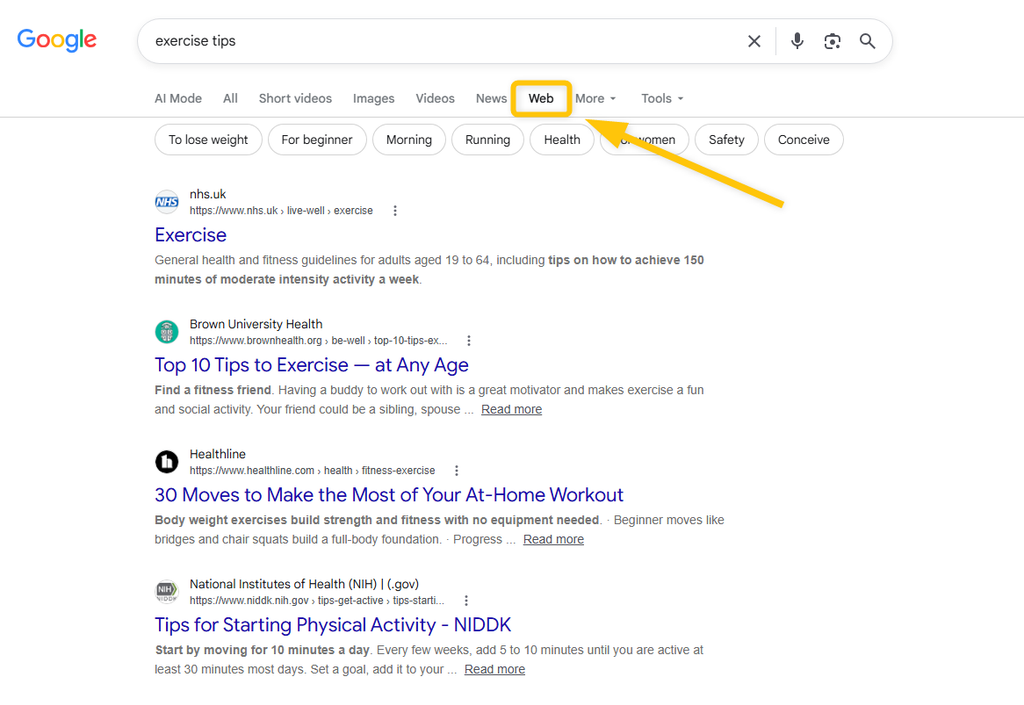
For local businesses, maps and shopping, its results are still the most complete.
Security and privacy features
All Google searches are encrypted with HTTPS. Google says it never sells your personal information, and you can review, pause or auto-delete your search history in My Activity.
Google also says its spam-fighting systems detect around 40 billion spammy pages every day to keep them out of the results.
On the other hand, Google uses your activity to personalize results and ads unless you turn that off.
| Pros | Cons |
|---|---|
| The most accurate and comprehensive results | Collects a lot of data for personalization and ads |
| Best local results, maps and rich features | Ads and AI answers push organic results down |
| Enormous potential traffic for websites | Fierce competition for organic traffic |
SEO documentation
Google provides the most extensive SEO documentation of any search engine through Google Search Central.
The SEO Starter Guide covers the basics of crawling, indexing and helping Google understand your content. There’s also a guide for web developers and a page on AI features and your website, which explains how AI Overviews and AI Mode use web content.
2. Microsoft Bing
| Best for | Type | Own index | Launched | Website | Monthly searches (KWFinder) |
|---|---|---|---|---|---|
| The best direct Google alternative | General web + AI | Yes | 2009 | bing.com | 13.6M (“bing”) |
Launched in June 2009 by Microsoft, Bing is the second-largest search engine in the world, with 5.29% of global searches and 9.89% in the US in September 2026. In 2026, Microsoft also said that Bing reached 1 billion monthly active users for the first time.
Bing matters far more than its share suggests, because its index powers Yahoo! and AOL, and a large part of DuckDuckGo’s and Ecosia’s results.
Bing is known for its strong image and video search and the Microsoft Rewards program, which gives you points for searching that you can redeem for gift cards.
Copilot in Bing: Bing shows AI-generated answers with citations on many results pages, and Copilot Search lets you dig deeper in a chat. The standalone Copilot app is built into Windows and Edge.
Bing also has more extras than most search engines. Its homepage shows a new photo every day, with a short quiz about the place in it, and plenty of people keep it as their start page just for that.
Bing Image Creator lets you generate images from a text prompt for free, and visual search lets you upload a photo to find similar products or identify landmarks.
If you use Windows and Edge, you’re probably using Bing already.
Security and privacy features
Bing encrypts searches with HTTPS. You can view and delete your search history in the Microsoft privacy dashboard and set SafeSearch to filter adult content.
Like Google, Bing personalizes results and ads based on your activity, especially when you’re signed in with a Microsoft account.
| Pros | Cons |
|---|---|
| The most complete alternative to Google | Smaller index and weaker local results in some markets |
| Copilot AI answers with clear citations | Works best when signed in and using Edge |
| Rewards program and cheaper ads for advertisers | Collects data for personalization and ads |
SEO documentation
The Bing Webmaster Guidelines explain how Bing crawls, indexes and ranks content, and note that Bing and Copilot share the same crawling and indexing foundation.
In Bing Webmaster Tools, you can submit sitemaps and use IndexNow, a protocol Bing co-created with Yandex in 2021. Since February 2026, you can also check the AI Performance report, which shows how often your pages are cited in Copilot and Bing’s AI answers.
3. Yahoo!
| Best for | Type | Own index | Launched | Website | Monthly searches (KWFinder) |
|---|---|---|---|---|---|
| News, finance and mail in one place | Web portal (Bing-powered) | No (Bing) | 1994 | search.yahoo.com | 96.5M (“yahoo”) |
Yahoo! started in January 1994 as a web directory created by Stanford students Jerry Yang and David Filo. It was once the most visited site on the web, and today its search results are powered by Microsoft Bing.
Yahoo! has been owned by Apollo Global Management since 2021. In September 2026, it held 1.36% of the global market and 2.64% in the US.
Yahoo! works as a portal, with Yahoo Mail, Yahoo Finance, Yahoo News and Yahoo Sports around the search box. In January 2026, it launched Yahoo Scout, an AI answer engine in beta for US users that uses Anthropic’s Claude as its main model and Bing’s grounding API for sources.
Scout also works inside other Yahoo! products. It summarizes emails in Yahoo Mail, adds key takeaways to Yahoo News stories and analyzes stocks in Yahoo Finance.
Since March 2026, logged-in users can also build MyScout, a personalized homepage of AI answers about their news, teams and stocks. Yahoo! has also joined Microsoft’s Publisher Content Marketplace pilot, which aims to pay publishers when AI uses their content.
Yahoo Finance is still one of the most used finance sites on the web, and the search page shows a live panel of trending searches.
If Yahoo Mail or Yahoo Finance is already your homepage, searching from there makes sense.
Security and privacy features
Yahoo! encrypts searches and offers a privacy dashboard to manage your data. It does collect data to personalize content and ads across its network.
| Pros | Cons |
|---|---|
| News, finance and mail in one place | Organic results come from Bing |
| Yahoo Scout AI answers with inline citations | Busy, ad-heavy portal pages |
| Simple, familiar search experience | Tracks activity for personalized ads |
SEO documentation
Because Yahoo! uses Bing’s index, you optimize for Yahoo! through Bing Webmaster Tools. If your site performs well in Bing, it will usually show up in Yahoo! too.
4. Yandex
| Best for | Type | Own index | Launched | Website | Monthly searches (KWFinder) |
|---|---|---|---|---|---|
| Russian-language search | General web | Yes | 1997 | yandex.com | 73M (“yandex”) |
Yandex (from “Yet Another iNDEXer”) is a Russian search engine created by Arkady Volozh and Ilya Segalovich, with Arkady Borkovsky, and launched in September 1997.
Often called the “Google of Russia”, Yandex is the market leader in Russia and is also used in Kazakhstan, Belarus, Uzbekistan and Turkey.
Worldwide, it had a 1.30% share in September 2026. In 2024, Yandex’s Dutch parent company sold the Russian business to a group of Russian investors, and its international part became Nebius.
Yandex offers local search results and many services: Maps, Translate, Music, the voice assistant Alice and AI answers powered by its own YandexGPT models.
Yandex started ranking results with machine learning early. Its MatrixNet algorithm launched in 2009, six years before Google’s RankBrain.
Its reverse image search is often better than Google’s at finding the same face, place or product in other photos.
SEOs know Yandex for another reason. In January 2023, parts of its source code leaked online, including a list of about 1,900 ranking factors. Search engines almost never reveal that much about how they rank pages.
Outside Russian-speaking countries, there’s little reason to use it day to day.
Security and privacy features
Yandex encrypts connections and offers safe search filters. However, as a Russian company it must follow Russian laws on data storage and on providing data to authorities, and it removes content when required by Russian regulators.
| Pros | Cons |
|---|---|
| Best results for Russian-language searches | Subject to Russian censorship and data laws |
| Excellent reverse image search | Blocked in Ukraine since 2017 |
| Strong local and map results in its region | Limited relevance outside Russia and Central Asia |
SEO documentation
Yandex has a free tool called Yandex Webmaster to monitor indexing, search queries and technical errors. It also supports IndexNow. For more details, visit its official webmaster guidelines.
5. DuckDuckGo
| Best for | Type | Own index | Launched | Website | Monthly searches (KWFinder) |
|---|---|---|---|---|---|
| Easy private everyday search | Privacy | Partly (mostly Bing) | 2008 | duckduckgo.com | 52.4M (“duckduckgo”) |
Created by Gabriel Weinberg in 2008, DuckDuckGo is an American search engine known for its strong emphasis on privacy. Its results come mostly from Bing, combined with its own crawler (DuckDuckBot) and sources like Wikipedia.
DuckDuckGo had 0.74% of the global market and 1.75% in the US in September 2026, making it the largest private search engine.
Its best-known feature is !bangs: shortcuts that send your search straight to another site. For example, “!w search engine” searches Wikipedia and “!a headphones” searches Amazon.
DuckDuckGo also offers optional AI answers (Search Assist) and Duck.ai, a private chat with models from providers like OpenAI and Anthropic, where conversations aren’t used for training. If you don’t want AI at all, there’s an AI-free version at noai.duckduckgo.com.
The name comes from the children’s game “Duck, Duck, Goose”. DuckDuckGo’s maps and local results come from Apple Maps, so you get good maps without Google tracking you. Its Email Protection gives you a free @duck.com address that strips trackers from emails before forwarding them to your inbox.
For maximum privacy, DuckDuckGo also runs a version of its search engine on the Tor network.
For most people who want more privacy, it’s the easiest place to start.
Security and privacy features
DuckDuckGo doesn’t store your IP address or search history and doesn’t build a profile of you, so everyone gets the same results for the same query. Its ads are based only on what you search, not on who you are. The DuckDuckGo browser adds tracker blocking and the Fire Button, which deletes your browsing data in one tap.
| Pros | Cons |
|---|---|
| No tracking or search profiles | Fewer rich features than Google |
| !bangs shortcuts to thousands of sites | Results depend heavily on Bing |
| AI features are optional (or off completely) | Weaker local results |
SEO documentation
DuckDuckGo doesn’t have webmaster tools. Since it relies mostly on Bing, the best way to rank there is to optimize for Bing through Bing Webmaster Tools. For more tips, check out this simple guide.
6. Baidu
| Best for | Type | Own index | Launched | Website | Monthly searches (KWFinder) |
|---|---|---|---|---|---|
| Searching the Chinese web | Regional | Yes | 2000 | baidu.com | 2.16M (“百度”) |
Baidu, founded by Robin Li and Eric Xu in January 2000, is the leading search engine in China, where Google isn’t available. Its global share is small (0.44% in September 2026), but at home it handles a huge share of searches.
According to its Q2 2026 results, the Baidu App had 644 million monthly active users in June 2026.
Baidu has rebuilt its search around its ERNIE AI models, which answer questions directly in the results. Its ERNIE assistant sits right in the search box, so you can switch from classic search to an AI chat with one tap.
Baidu’s founder Robin Li developed RankDex, a system that ranked websites by the links pointing to them, in 1996, and patented it in the US (filed in 1997, granted in 1999). RankDex came before Google’s PageRank, and Larry Page’s PageRank patent even cites Li’s work.
Around search, Baidu has built a whole ecosystem, including Baidu Maps, Baidu Baike (China’s largest online encyclopedia), Baidu Zhidao (Q&A), Baidu Tieba (forums) and Baidu Wenku (documents).
If you do business in China, you’ll need to learn how it works.
Security and privacy features
Baidu encrypts searches, but as a Chinese company it must follow Chinese law, including censorship rules and data access by authorities.
| Pros | Cons |
|---|---|
| The best coverage of the Chinese-language web | Censored search results |
| ERNIE AI answers built into search | Little value for non-Chinese content |
| Huge ecosystem (Baike, Tieba, Maps) | Data subject to Chinese government access |
SEO documentation
Baidu’s official tool and documentation is the Baidu Search Resource Platform. It helps you submit pages, monitor indexing and fix technical issues. Sites in Simplified Chinese, hosted in mainland China with an ICP license, usually perform best.
7. ChatGPT Search
| Best for | Type | Own index | Launched | Website | Monthly searches (KWFinder) |
|---|---|---|---|---|---|
| Conversational answers with sources | AI answer engine | Partly (own crawler + partners) | 2024 | chatgpt.com | 1.16B (“chatgpt”) |
ChatGPT Search is OpenAI’s web search built into ChatGPT. It launched in October 2024 (after the SearchGPT prototype) and is available to everyone, even without logging in.
According to OpenAI, ChatGPT had 1.2 billion weekly users in September 2026.
When a question needs fresh information, ChatGPT searches the web and writes an answer with inline citations and a list of sources. You can also compare products or search for places on a map.
ChatGPT Search remembers the context of your conversation, so you can refine a search the way you’d talk to a person (“now only ones under $100”, “what about in Spanish?”). For bigger questions, deep research spends several minutes reading dozens of sources and writes a full report with citations.
OpenAI also built ChatGPT Atlas, a web browser with ChatGPT inside. Its agent mode can open pages, compare products and fill in forms for you while you watch.
Use it for questions that would normally take three or four Google searches.
Security and privacy features
By default, your conversations can be used to improve OpenAI’s models, but you can turn that off in Data controls or use Temporary Chat. Business plans don’t use your data for training.
| Pros | Cons |
|---|---|
| Natural, conversational follow-up questions | Can make mistakes, so check important facts |
| Answers cite and link their sources | Weaker local results and fewer rich features |
| Combines search with writing and analysis | Chats may be used for training unless you opt out |
SEO documentation
OpenAI documents its crawlers in its bots overview. To appear in ChatGPT Search, allow OAI-SearchBot in your robots.txt. Blocking GPTBot only stops your content from being used for training. Being well indexed in Bing also helps.
8. Perplexity
| Best for | Type | Own index | Launched | Website | Monthly searches (KWFinder) |
|---|---|---|---|---|---|
| Research with citations | AI answer engine | Partly (own crawler + partners) | 2022 | perplexity.ai | 14.2M (“perplexity”) |
Perplexity is an AI-powered answer engine launched in December 2022 by Aravind Srinivas, Denis Yarats, Johnny Ho and Andy Konwinski. Instead of a list of links, it searches the web in real time and writes a concise answer with numbered citations.
In May 2025, the CEO said Perplexity handled 780 million queries in a single month, growing more than 20% month over month. It hasn’t published a comparable official figure since.
Perplexity offers Pro Search and Deep Research for longer reports, lets Pro users choose between AI models, and made its Comet AI browser free for everyone in October 2025.
Spaces let you keep research on one topic together, with your own files and instructions, and the Discover feed turns trending news into short, sourced summaries.
Perplexity is also experimenting with paying publishers. Its Comet Plus subscription shares most of its revenue with the publishers whose content it uses.
We reach for it when we need a quick, sourced summary of a topic.
Security and privacy features
You can use Perplexity without an account, and signed-in users can turn off AI data retention in their settings. Its enterprise plans are SOC 2 certified.
| Pros | Cons |
|---|---|
| Transparent citations for every answer | Can still misread or misquote sources |
| Great for research and quick summaries | Publishers have sued it over how it uses their content |
| Follow-up questions and Deep Research mode | The best features need a Pro plan ($20/month) |
SEO documentation
Perplexity doesn’t have SEO guidelines, but it documents its crawlers (PerplexityBot and Perplexity-User) in its developer docs, so you can make sure your robots.txt doesn’t block them.
9. Brave Search
| Best for | Type | Own index | Launched | Website | Monthly searches (KWFinder) |
|---|---|---|---|---|---|
| Privacy without relying on Google or Bing | Privacy, independent index | Yes | 2021 | search.brave.com | 3.1M (“brave search”) |
Brave Search is a privacy-focused search engine from the makers of the Brave browser. It launched in 2021 and has run on its own independent index since 2023, without relying on Google or Bing.
In August 2026, Brave Search handled 2.51 billion queries and the Brave browser had 126.25 million monthly active users. In July 2026, Brave Search was also added to Chrome’s global list of default search engines.
You can turn its AI summaries (called Answer with AI) on or off. Goggles, its custom filters, let you re-rank results, for example to hide big corporate sites, and a Discussions module shows posts from forums like Reddit. Brave Search Premium removes ads.
Brave also sells access to its index. Its Search API supplies real-time web results to many AI apps and chatbots, so an AI assistant you use may be grounding its answers in the same index you search.
It supports !bangs like DuckDuckGo, and Brave says around 8% of its queries come from people using other browsers.
It’s the privacy engine we’d suggest to someone who still wants AI answers and a modern results page.
Security and privacy features
Brave Search doesn’t profile its users or track their searches. In the Brave browser, Shields block trackers and fingerprinting, connections are upgraded to HTTPS automatically, and private windows can route traffic through Tor.
| Pros | Cons |
|---|---|
| Fully independent index | Smaller index for very niche queries |
| Strong privacy with no profiling | Weaker local results than Google |
| Goggles let you customize rankings | Ads in the free version |
SEO documentation
Brave has no webmaster console, but it has a community forum where webmasters discuss indexing issues.
10. Naver
| Best for | Type | Own index | Launched | Website | Monthly searches (KWFinder) |
|---|---|---|---|---|---|
| Searching in Korean | Regional | Yes | 1999 | naver.com | 44.3M (“네이버”) |
Often called the “Korean Google”, Naver was launched in 1999 and is South Korea’s largest web portal. It introduced “comprehensive search”, which shows news, blogs, Q&A, shopping and maps on a single results page.
How big Naver is depends on who measures. InternetTrend put Naver at 64.28% of Korean searches in the first half of 2026, while StatCounter showed Google narrowly ahead in September 2026 (47.97% vs. 43.06%). Either way, Naver’s new AI Briefing and AI Tab features helped it gain ground in 2026.
Naver’s strength is its own content ecosystem, built largely by its users: KnowledgeiN, a Q&A community launched in 2002 that answered Korean questions years before Quora existed, plus Naver Blog, Naver Cafe, Naver Shopping, Naver Maps and Naver Pay. Blog and Cafe posts often fill the first results page.
Naver also develops its own large language model, HyperCLOVA X, which powers its AI Briefing answers, so its AI search is trained specifically on Korean language and culture.
Any marketing plan for South Korea has to include it.
Security and privacy features
Naver follows South Korea’s strict Personal Information Protection Act and lets users manage their data in account settings. It collects data to personalize content and ads.
| Pros | Cons |
|---|---|
| The best results for Korean searches | Mostly useful for Korean-language content |
| AI Briefing summaries in search | Favors its own Blog and Cafe content |
| One place for blogs, Q&A, shopping and maps | Harder to rank for outside websites |
SEO documentation
Naver’s official webmaster tool is Naver Search Advisor, with data on indexing status, SEO and diagnostics. Naver also supports IndexNow. For a deeper look, read this Naver SEO guide.
11. Ecosia
| Best for | Type | Own index | Launched | Website | Monthly searches (KWFinder) |
|---|---|---|---|---|---|
| Searching for the planet | Eco-friendly | Partly (Staan; mostly Bing) | 2009 | ecosia.org | 674K (“ecosia”) |
Ecosia, based in Berlin, was launched by Christian Kroll on December 7, 2009. It uses the profits from its search ads to plant trees and fund climate projects, and it publishes monthly financial reports. Ecosia says it has funded more than 250 million trees.
Since 2018, Ecosia has been steward-owned, which means it can’t be sold for profit and its owners can’t take profits out.
Ecosia’s results and ads come from Microsoft Bing by default, and from Google in some regions and browsers if you allow it. In France, Ecosia can also show results from Staan, the independent European index it built with Qwant, which started serving results in August 2025. Ecosia also offers an AI chat that it says runs on smaller, more efficient models.
Ecosia shows a personal tree counter right in the search bar, so you can see how many trees your searches have helped plant. It also invests in solar power plants and says it produces more renewable energy than its servers use.
The index it built with Qwant is open to other companies too, so Ecosia is helping to create a European alternative to Google and Bing for AI tools and apps.
Switching costs you nothing, and the ads you click help pay for the trees.
Security and privacy features
Ecosia doesn’t sell your data to advertisers and doesn’t use third-party trackers. Searches are anonymized within a week.
On the other hand, Ecosia collects and processes some data, like IP addresses and search terms, to provide results, and it shares search queries with its partners to show results and ads.
| Pros | Cons |
|---|---|
| Profits fund tree planting and climate projects | Results come from partners, mostly Bing |
| Growing independent European index (Staan) | Fewer advanced features than Google |
| Transparent monthly financial reports | Ads (and clicks on them) fund the trees |
SEO documentation
Ecosia doesn’t have SEO documentation. Universal SEO principles apply, and since most of its results come from Bing (and some from Google), ranking well in those two covers most of Ecosia.
12. Startpage
| Best for | Type | Own index | Launched | Website | Monthly searches (KWFinder) |
|---|---|---|---|---|---|
| Google results without tracking | Privacy | No (Google) | 1998 (as Ixquick) | startpage.com | 1.8M (“startpage”) |
Startpage is a Dutch search engine that gives you Google’s results without Google’s tracking. It sends your query to Google anonymously, strips out anything that identifies you, and shows the results.
Its best feature is Anonymous View: click the mask icon next to a result and the page opens through Startpage’s proxy, so the website can’t see your IP address.
Startpage doesn’t add AI-generated answers to its results, either. In 2026, that has become rare.
Startpage grew out of Ixquick, a privacy metasearch engine launched in 1998. Instead of storing your search settings in cookies, it can save them in a personal URL that you bookmark, so your preferences work without any tracking.
Its mobile app wipes your search history with one tap and includes the same Anonymous View proxy as the website.
It’s the simplest way to keep Google’s results and drop Google’s tracking.
Security and privacy features
Startpage doesn’t log your IP address or searches, uses minimal cookies and shows ads based only on your query. It’s based in the Netherlands, so EU privacy law (GDPR) applies.
| Pros | Cons |
|---|---|
| Google-quality results without tracking | Few rich features like Knowledge Panels |
| Anonymous View proxy for visiting sites | Depends entirely on other engines’ results |
| No AI clutter | Majority-owned by advertising company System1 since 2019 |
SEO documentation
Startpage has no SEO documentation. Since its results come from Google, optimizing for Google is enough.
13. Kagi
| Best for | Type | Own index | Launched | Website | Monthly searches (KWFinder) |
|---|---|---|---|---|---|
| Power users who want control | Paid, ad-free | Partly (own indexes + others) | 2022 | kagi.com | 68.5K (“kagi”) |
Kagi is a paid search engine founded by Vladimir Prelovac. Instead of showing ads, it charges a subscription, so its only job is to give you good results. Plans start at $5 per month and go up to $25 per month for the version with premium AI models.
Kagi combines its own indexes with results from other sources, and it gives you a lot of control over what you see:
- Block, lower, raise or pin websites so they always (or never) show up in your results.
- Lenses limit a search to forums, academic sources, programming sites or your own list of domains.
- Kagi Assistant lets you chat with different AI models using Kagi’s search results.
Kagi also runs a separate index of the “small web”, meaning personal blogs and independent sites, and highlights them in results. That helps surface content big engines often bury under SEO-heavy pages. It offers a Universal Summarizer for long articles and videos, too, and builds its own privacy-focused browser, Orion.
Whether it’s worth paying for depends on how much time you spend searching each day.
Security and privacy features
Kagi doesn’t track or sell your searches. Because you pay for it, its business model doesn’t depend on your data.
| Pros | Cons |
|---|---|
| No ads, ever | Paid subscription required |
| Full control over which sites you see | Cheapest plan has a search limit |
| Clean, fast results pages | Smaller company with fewer local features |
SEO documentation
Kagi has no SEO documentation. Its users can personally block or boost your domain, so a trustworthy site with no aggressive ads has the best chance there.
14. Qwant
| Best for | Type | Own index | Launched | Website | Monthly searches (KWFinder) |
|---|---|---|---|---|---|
| European, privacy-first search | Privacy (Europe) | Partly (Staan + Bing) | 2013 | qwant.com | 698K (“qwant”) |
Qwant is a French search engine launched in February 2013 and dedicated to user privacy, with no tracking or resale of personal data.
Together with Ecosia, Qwant built Staan, an independent European search index that started serving results in August 2025. Staan also powers Qwant’s AI summaries, so they rely less on American infrastructure than most AI search features. The rest of its results come from Bing.
Qwant also runs Qwant Junior, a search engine designed for schools and children aged 6 to 12 that filters out violent, adult and commercial content.
It makes most sense for European users who want their data to stay under EU rules.
Security and privacy features
Qwant doesn’t use your search history to personalize results or ads, encrypts all queries and is hosted in Europe under the GDPR.
| Pros | Cons |
|---|---|
| Strong privacy protection | Results for non-European queries are weaker |
| Growing independent European index | Part of the results still come from Bing |
| Qwant Junior for kids | Fewer features than Google |
SEO documentation
Qwant doesn’t publish ranking guidelines. Being indexed in Bing helps, and for more on how Qwant works, check out this simple article.
15. Mojeek
| Best for | Type | Own index | Launched | Website | Monthly searches (KWFinder) |
|---|---|---|---|---|---|
| An unpersonalized second opinion | Independent index | Yes | 2004 | mojeek.com | 41.6K (“mojeek”) |
Mojeek is a UK-based search engine with its own crawler (MojeekBot) and its own index, built entirely in-house. It started as a personal project by Marc Smith in 2004 and became Mojeek Limited in 2009.
Because it doesn’t personalize anything, everyone sees the same results for the same query.
It also has some unusual features: custom Focus searches, a search for Substack articles and an emotion search (add /emotions to its URL) that uses machine learning to sort pages by the feeling they convey, like happy, sad or angry.
Mojeek says it was the first search engine with a privacy policy promising not to track users, and it keeps AI out of its main results.
Use it as a second opinion when Google and Bing keep showing you the same pages.
Security and privacy features
Mojeek doesn’t track users or store identifying information like IP addresses, search history or clicks.
| Pros | Cons |
|---|---|
| Truly independent index | Much smaller index than Google or Bing |
| No tracking or personalization | Mostly plain blue links |
| Unique emotion and Substack search | Results can feel less polished |
SEO documentation
Mojeek offers an API with access to its web results, and the Mojeek Community is where webmasters discuss indexing. Make sure your robots.txt doesn’t block MojeekBot.
16. Swisscows
| Best for | Type | Own index | Launched | Website | Monthly searches (KWFinder) |
|---|---|---|---|---|---|
| Safe search for families | Family-friendly | Partly (own index + Bing) | 2014 | swisscows.com | 25.7K (“swisscows”) |
Swisscows was launched in 2014 by Hulbee AG, based in Egnach, Switzerland. It’s a family-friendly search engine that filters out adult and violent content.
Swisscows uses semantic technology to understand queries and combines its own index (strongest in German) with Bing’s results. It also offers a music search that plays tracks from SoundCloud and an anonymous page preview.
The same company also offers private email, a VPN and a private messenger. Swisscows’ family filter is built into the engine itself, so children can’t switch it off.
Parents and schools are its main audience.
Security and privacy features
Swisscows doesn’t use tracking cookies, doesn’t store search queries and secures all connections with HTTPS. Swiss data protection law applies.
| Pros | Cons |
|---|---|
| Safe for children by default | The family filter can’t be turned off |
| No query storage or tracking | German pages sometimes dominate |
| Anonymous page previews | Fewer features than the big engines |
SEO documentation
Swisscows doesn’t offer SEO documentation. Since many of its results come from Bing, Bing Webmaster Tools is the best place to start.
17. Seznam
| Best for | Type | Own index | Launched | Website | Monthly searches (KWFinder) |
|---|---|---|---|---|---|
| Searching in Czech | Regional | Yes | 1996 | seznam.cz | 29.9M (“seznam”) |
Seznam is a Czech search engine and web portal launched in 1996 by Ivo Lukačovič. It’s one of the few European search engines with its own full-scale index, and it has held its ground against Google in its home market for nearly 30 years.
Seznam is built for Czech users, with local news, weather, email and dozens of other services, attracting millions of visitors every month.
Its map service, Mapy.com (formerly Mapy.cz), is popular with hikers for its detailed tourist maps, and its business directory Firmy.cz feeds local results, a bit like Google Business Profile.
If you sell to Czech customers, check how your site ranks here too.
Security and privacy features
Seznam stores its data in its own data centers in the Czech Republic and follows the GDPR. Like most free search engines, it uses some personal data to improve results and ads.
| Pros | Cons |
|---|---|
| Best local relevance for Czech searches | Little use outside the Czech Republic |
| Own index and many local services | Smaller than Google |
| User-friendly portal | Fewer advanced features |
SEO documentation
Seznam offers SEO help through “Seznam Webmaster” and supports IndexNow. The main advice is to focus on users and useful content, similar to Google’s. For more, read this comprehensive Seznam SEO guide.
18. Sogou
| Best for | Type | Own index | Launched | Website | Monthly searches (KWFinder) |
|---|---|---|---|---|---|
| WeChat content in China | Regional | Yes | 2004 | sogou.com | 37.4K (“sogou”) |
Sogou (“searching dog”) was launched in 2004 by Sohu and has been owned by Tencent since 2021.
Sogou’s main draw is WeChat search, which lets you search public articles from WeChat official accounts on the open web. Without it, that content is locked inside the app. Its Sogou Input Method is also one of China’s most widely used keyboards.
When you need something published on WeChat, start here.
Security and privacy features
In 2023, researchers found a serious flaw in the encryption of the Sogou keyboard app that could expose what users typed. Sogou fixed it, but the case raised concerns about its security practices. Chinese censorship and data laws also apply.
| Pros | Cons |
|---|---|
| Search across WeChat articles | Past security flaw in its keyboard app |
| Backed by Tencent’s ecosystem | Censored results |
| Strong Chinese-language tools | Little value outside China |
SEO documentation
Sogou has its own webmaster platform with information about indexing and traffic. For more tips, check out this guide to Sogou SEO.
19. 360 Search (Haosou)
| Best for | Type | Own index | Launched | Website | Monthly searches (KWFinder) |
|---|---|---|---|---|---|
| China’s #2 desktop alternative | Regional | Yes | 2012 | so.com | 3K (“so.com”) |
360 Search (so.com) was launched in 2012 by Qihoo 360, a Chinese internet security company. It was briefly rebranded as Haosou in 2015 before returning to the 360 Search name.
It quickly became one of China’s most popular search engines, especially on desktop, because it’s built into the widely used 360 Safe Browser. It offers news, Q&A, video, images, maps, health and encyclopedia searches.
360 Search uses data from Qihoo 360’s security software to flag scam and phishing sites directly in the results, a safety layer most search engines don’t show so clearly.
If you target China, it’s the next engine to check after Baidu.
Security and privacy features
Like other Chinese search engines, 360 Search is subject to Chinese censorship and data laws.
| Pros | Cons |
|---|---|
| Strong desktop reach in China | Still far behind Baidu |
| Warnings for scam and malware sites | Censored results |
| Wide range of vertical searches | Limited documentation in English |
SEO documentation
360 Search has a webmaster platform for submitting sites and checking indexing. It’s available only in Chinese, so international site owners usually work with a local partner.
20. Shenma
| Best for | Type | Own index | Launched | Website | Monthly searches (KWFinder) |
|---|---|---|---|---|---|
| Mobile search in China | Regional, mobile | Yes | 2014 | m.sm.cn | 1.8K (“shenma”) |
Shenma is a mobile-first search engine launched in 2014 by Alibaba Group together with UCWeb. Its name means “magic horse” and is also Chinese slang for “what?”.
Shenma is built into UC Browser. Alibaba now puts most of its AI search effort into its Quark app.
It launched at a time when most Chinese search engines were still desktop-first. Thanks to Alibaba, it’s closely tied to shopping, and its results lean heavily toward apps, products and reviews.
For most site owners, it only matters if they target mobile users in China.
Security and privacy features
Shenma doesn’t publish detailed privacy features, and like other Chinese search engines, it’s subject to China’s strict internet regulations.
| Pros | Cons |
|---|---|
| Built for fast mobile search | Censored search results |
| Strong shopping and app results | Smaller share than Baidu |
| Integrated with UC Browser | Mobile only |
SEO documentation
Shenma offers Shenma Webmaster Tools. To learn more, read this Shenma SEO guide.
21. Cốc Cốc
| Best for | Type | Own index | Launched | Website | Monthly searches (KWFinder) |
|---|---|---|---|---|---|
| Searching in Vietnamese | Regional | Yes | 2013 | coccoc.com | 234K (“cốc cốc”) |
Cốc Cốc is a Vietnamese browser and search engine launched in 2013 by a Hanoi-based tech company and built around Vietnamese language processing.
Cốc Cốc is Vietnam’s main local alternative to Google and Chrome, holding a single-digit share of the Vietnamese search market.
Cốc Cốc understands Vietnamese typed without diacritics (the accent marks), which is how many people type quickly on phones, and still returns the right results. Its browser also adds Vietnamese-specific tools like built-in spell checking and a media download manager.
If you target Vietnam, track your rankings here as well as on Google.
Security and privacy features
Cốc Cốc warns users about phishing and malware sites. It collects data to personalize content and ads.
| Pros | Cons |
|---|---|
| Optimized for Vietnamese searches | Little use outside Vietnam |
| Browser and search in one | Much smaller than Google in Vietnam |
| Unsafe site warnings | Collects data for ads |
SEO documentation
Cốc Cốc offers a simple guide for optimizing websites for its search engine. Key tips include using relevant keywords, making subpages accessible through internal links and limiting the number of links on a page.
22. Petal Search
| Best for | Type | Own index | Launched | Website | Monthly searches (KWFinder) |
|---|---|---|---|---|---|
| Huawei devices | Mobile | Yes | 2020 | huawei.com | 10.4K (“petal search”) |
Petal Search is Huawei’s search app, launched in 2020. It helps users find apps, news, shopping deals and web results.
It supports visual search, so you can photograph an object and find similar products. In 2021, Huawei said Petal Search had 18 million active users outside China.
Petal Search exists because of a gap: Huawei phones sold outside China since 2019 can’t ship with Google services. Petal fills it by combining web results with app search linked to Huawei’s AppGallery, so users can find and install apps straight from search.
Unless you own a Huawei phone, you probably won’t come across it.
Security and privacy features
Petal Search follows the GDPR in Europe and offers an incognito mode.
| Pros | Cons |
|---|---|
| Built for Huawei devices | Small user base outside Huawei phones |
| Visual and app search | Limited web index |
| GDPR-compliant in Europe | Few reasons to use it on other devices |
SEO documentation
Petal Search provides documentation for website owners, information about its crawler PetalBot and its own webmaster tool.
23. AOL
| Best for | Type | Own index | Launched | Website | Monthly searches (KWFinder) |
|---|---|---|---|---|---|
| Long-time AOL users | Web portal (Bing-powered) | No (Bing) | 1983 | aol.com | 5.84M (“aol”) |
AOL (America Online) is an American web portal founded in 1983 and best known for bringing millions of Americans online in the 1990s with its dial-up service.
AOL Search has been powered by Bing since 2016. Its ownership changed several times, from Time Warner and Verizon to Yahoo!, and since January 2026 it has belonged to Bending Spoons, which completed its acquisition of AOL on January 2, 2026. When the deal was announced, AOL had around 30 million monthly active users.
AOL’s “You’ve got mail!” greeting became a pop-culture catchphrase (it even gave a 1998 movie its title), and its dial-up service kept running until September 30, 2025. Today, AOL Mail is its main product, with search as part of the portal around it.
If you already use AOL Mail, its search is right there. Otherwise, Bing gives you the same organic results.
Security and privacy features
AOL follows its owner’s privacy policy and offers account security tools. Like Yahoo!, it uses data for personalized ads.
| Pros | Cons |
|---|---|
| Familiar portal with news and email | Results come from Bing |
| Simple, general-purpose search | Few modern search features |
| Loyal long-time user base | Ad-heavy pages |
SEO documentation
AOL Search uses Bing’s index. If your site is in Bing, it should appear on AOL as well.
24. You.com
| Best for | Type | Own index | Launched | Website | Monthly searches (KWFinder) |
|---|---|---|---|---|---|
| AI research and APIs | AI search | Yes | 2021 | you.com | 33.8K (“you.com”) |
You.com is an AI search platform founded in 2020 by Richard Socher and Bryan McCann. It launched publicly as a search engine in 2021.
In December 2022, just weeks after ChatGPT, You.com became one of the very first search engines to put an AI chatbot, YouChat, next to its results. Today it lets users switch between AI models from different providers and offers research and agent modes for long tasks.
In September 2025, You.com reached a $1.5 billion valuation and shifted its focus from consumer search to AI search for businesses and developers. It processes around one billion queries a month across its platform and APIs.
Today it’s built more for developers than for everyday searches.
Security and privacy features
You.com doesn’t show ads in its answers and offers enterprise plans with strict data controls.
| Pros | Cons |
|---|---|
| Choice of several AI models | Focus has moved away from consumer search |
| Research and agent modes | Smaller consumer user base |
| APIs for developers | Best features are paid |
SEO documentation
There are no official SEO guidelines, but You.com offers an API for businesses that want to add AI-powered web search to their apps.
25. WolframAlpha
| Best for | Type | Own index | Launched | Website | Monthly searches (KWFinder) |
|---|---|---|---|---|---|
| Math, science and data | Computational | No (curated data) | 2009 | wolframalpha.com | 638K (“wolframalpha”) |
WolframAlpha is a computational answer engine developed by Wolfram Research and launched on May 18, 2009.
Instead of searching web pages, it computes answers from a curated knowledge base. You can solve equations, convert units, compare countries’ GDP or check the nutrition facts of a meal. It understands natural language and math notation, and shows step-by-step solutions in its Pro version.
If you’ve asked Siri a math or science question, you may have used WolframAlpha without knowing it, since it has powered many of those answers since 2011. Because every answer is calculated, the same question always returns the same verifiable result.
Reach for it whenever the answer is a number, a formula or a chart.
Security and privacy features
WolframAlpha isn’t a private search engine. It collects user information as described in its privacy policy.
| Pros | Cons |
|---|---|
| Exact answers for math, science and data | Not useful for opinions, news or general web search |
| Step-by-step solutions (Pro) | Best features are paid |
| Charts and visualizations | Not privacy-focused |
SEO documentation
WolframAlpha doesn’t link to websites in the usual way, so there’s no SEO documentation.
26. Internet Archive (Wayback Machine)
| Best for | Type | Own index | Launched | Website | Monthly searches (KWFinder) |
|---|---|---|---|---|---|
| Old versions of websites | Archive | Yes (web archive) | 1996 (Wayback Machine: 2001) | web.archive.org | 2.79M (“wayback machine”) |
The Internet Archive, a nonprofit based in San Francisco, started archiving the web in 1996 and opened the Wayback Machine to the public in 2001.
It lets you see how any website looked in the past, even on specific dates. In October 2025, it passed 1 trillion archived web pages. It also stores millions of free books, videos, audio recordings and software.
With Save Page Now, anyone can archive a page instantly to keep evidence or a source from disappearing. Since 2024, Google’s “About this result” panel can also point you to archived versions of a page in the Wayback Machine.
If a page you need has disappeared, this is the first place to look.
Security and privacy features
The Internet Archive doesn’t archive pages behind passwords or forms. Some pages are excluded at the site owner’s request.
| Pros | Cons |
|---|---|
| A unique archive of the web’s history | Not every page or version is saved |
| Great for research and checking old content | Basic search functionality |
| Free books, videos and software | Dynamic content often doesn’t archive well |
SEO documentation
There’s no SEO documentation, but SEOs use the Wayback Machine to check a domain’s history before buying it or to see how competitors changed their pages.
27. Openverse
| Best for | Type | Own index | Launched | Website | Monthly searches (KWFinder) |
|---|---|---|---|---|---|
| Free, openly licensed images and audio | Media | No (open APIs, Common Crawl) | 2021 | openverse.org | 13K (“openverse”) |
Openverse is part of the WordPress project and helps you find openly licensed and public domain images and audio. It succeeded CC Search from Creative Commons in 2021.
It searches more than 800 million images and audio tracks from open APIs and the Common Crawl dataset.
Openverse lets you filter results by license, so you can show only works you can use commercially or modify. Every result comes with a ready-made attribution in several formats, which you can paste under your image or audio track.
If you need a free image for a blog post, it’s a safer bet than grabbing one from Google Images.
Security and privacy features
Openverse follows the privacy policy of WordPress.org. It doesn’t verify licensing information or the accuracy of attributions, so always check the original source.
| Pros | Cons |
|---|---|
| Free, openly licensed media | Only images and audio |
| One-click attribution | Licenses aren’t verified |
| Huge searchable collection | Image quality varies |
SEO documentation
There are no SEO guidelines, but its official documentation explains how the search engine works.
28. Dogpile
| Best for | Type | Own index | Launched | Website | Monthly searches (KWFinder) |
|---|---|---|---|---|---|
| Results from several engines at once | Metasearch | No (metasearch) | 1996 | dogpile.com | 275K (“dogpile”) |
Dogpile is a metasearch engine created by Aaron Flin in November 1996. It sends your query to major search engines and combines the results on one page, with separate tabs for images, video and news.
Dogpile’s mascot, Arfie the dog, “fetches” the results, and its “Favorite Fetches” box shows what people are searching for on the site.
Use it when you want a second view of the results without opening several tabs.
Security and privacy features
Dogpile isn’t built for anonymity. It collects data about users and their devices and uses it for targeted ads.
| Pros | Cons |
|---|---|
| Results from several engines at once | Collects data for targeted ads |
| Simple, easy-to-use interface | Ad-heavy results pages |
SEO documentation
Specific SEO documentation for Dogpile isn’t available. Ranking well in the major engines is what gets you into Dogpile.
29. MetaCrawler
| Best for | Type | Own index | Launched | Website | Monthly searches (KWFinder) |
|---|---|---|---|---|---|
| Simple combined results | Metasearch | No (metasearch) | 1995 | metacrawler.com | 5.9K (“metacrawler”) |
Created by Erik Selberg and Oren Etzioni at the University of Washington in 1995, MetaCrawler is one of the oldest metasearch engines. It combines results from major search engines and offers image, video and news searches.
MetaCrawler started as a university research project and was one of the first engines to prove that combining several indexes could beat any single one in the 1990s. Today it keeps a deliberately simple, clutter-free design.
It’s now one of several metasearch sites owned by System1, alongside Dogpile and WebCrawler.
Security and privacy features
MetaCrawler passes your queries to other search engines and shows targeted ads, so it isn’t a privacy tool.
| Pros | Cons |
|---|---|
| Combined results from several engines | Privacy concerns |
| Simple, minimalist interface | Few customization options |
SEO documentation
Specific SEO documentation for MetaCrawler isn’t available.
30. Presearch
| Best for | Type | Own index | Launched | Website | Monthly searches (KWFinder) |
|---|---|---|---|---|---|
| Web3 fans | Decentralized | Partly (own index + partners) | 2017 | presearch.com | 27.3K (“presearch”) |
Presearch is a decentralized search engine that runs on a network of independent nodes instead of one company’s servers. Your queries are anonymized and spread across the network, so no single provider holds your search history.
Users can earn PRE, Presearch’s crypto token, for searching. It also offers its own AI answers, which you can switch off.
Its community runs part of the network. Node operators stake PRE tokens to run the servers that process searches, and advertisers stake tokens to bid for keywords. You can also switch your query to dozens of other engines with one click.
Crypto and Web3 fans will get the most out of it.
Security and privacy features
Presearch doesn’t track you or build a profile of your searches.
| Pros | Cons |
|---|---|
| Decentralized and private | Smaller, less polished results |
| Optional AI answers | Crypto rewards are capped and uncertain |
| Shortcuts to other search engines | Niche user base |
SEO documentation
Presearch has no SEO documentation.
31. MetaGer
| Best for | Type | Own index | Launched | Website | Monthly searches (KWFinder) |
|---|---|---|---|---|---|
| Private search from Germany | Metasearch, non-profit | No (metasearch) | 1996 | metager.org | 9.7K (“metager”) |
MetaGer is a German metasearch engine that started at Leibniz University Hannover in 1996.
It combines results from several sources and lets you search ad-free with a paid key.
MetaGer is one of the few search engines run by a non-profit association (SUMA-EV) rather than a company. Its source code is open for anyone to check, and it lets you open any result through its anonymizing proxy.
Pick it if you’d rather your searches support a non-profit.
Security and privacy features
MetaGer doesn’t store IP addresses or search profiles and is hosted in Germany under the GDPR.
| Pros | Cons |
|---|---|
| Non-profit and open-source | Free version shows ads |
| Anonymous proxy for opening results | Results less comprehensive than Google |
| Strong German privacy standards | Interface feels dated |
SEO documentation
MetaGer has no SEO documentation.
32. SearXNG
| Best for | Type | Own index | Launched | Website | Monthly searches (KWFinder) |
|---|---|---|---|---|---|
| Self-hosting your own search engine | Open-source metasearch | No (metasearch) | 2021 (fork of Searx) | searx.space | 61.6K (“searxng”) |
SearXNG is a free, open-source metasearch engine you can host yourself. It sends your query to dozens of search engines at once and combines the results without passing your identity along. It’s an actively developed fork of the original Searx project, which was discontinued in 2023.
If you don’t want to host it, you can use one of many public SearXNG instances.
With SearXNG, you can build your own search engine in an afternoon: pick which of its many supported engines to query, set your own bangs and themes, and run it on a server or a home computer. It’s popular with developers and privacy enthusiasts.
Running your own instance takes some technical skill, but the public ones work for anyone.
Security and privacy features
SearXNG doesn’t track or profile users. On your own instance, you decide what’s logged.
| Pros | Cons |
|---|---|
| Open-source and self-hostable | Public instances vary in speed and reliability |
| Combines many engines privately | Needs technical skills to self-host |
| Fully customizable | Some engines block metasearch requests |
SEO documentation
SearXNG has no SEO documentation, since it only shows results from other engines.
33. KARMA Search
| Best for | Type | Own index | Launched | Website | Monthly searches (KWFinder) |
|---|---|---|---|---|---|
| Supporting wildlife conservation | Charity | No (partner indexes) | 2022 | karmasearch.org | 1K (“karma search”) |
KARMA Search is a privacy-first search engine that says it donates 100% of its ad revenue to wildlife and nature nonprofits, such as Re:wild. Its results come from partner search indexes.
KARMA adds shortcuts to specialized tools like WolframAlpha and the Internet Archive right next to its results, and tells you which conservation projects its ad revenue supports.
It works like any other private search engine, with a good cause attached.
Security and privacy features
KARMA says it doesn’t track users or build profiles, and its ads are shown without personal identifiers.
| Pros | Cons |
|---|---|
| Ad revenue supports conservation | Relies on partner indexes |
| Privacy-friendly | Small user base |
| Shortcuts to tools like WolframAlpha | Fewer features than big engines |
SEO documentation
KARMA Search has no SEO documentation.
34. Yep
| Best for | Type | Own index | Launched | Website | Monthly searches (KWFinder) |
|---|---|---|---|---|---|
| Developers who need a search API | Independent index | Yes | 2022 | yep.com | 280 (“yep search”) |
Yep was launched by Ahrefs in 2022 as a private search engine that promised to share 90% of its ad revenue with content creators.
Today, Yep is offered mainly as a web search API for AI agents and apps. Its index is built by its parent company’s own crawler and covers more than 100 billion pages, with about 8 billion pages crawled every day in over 180 languages.
That makes it one of the few large web indexes created independently of Google and Bing. The API returns ready-made text highlights from each page, so developers can feed fresh web content straight into their apps.
For everyday searching, you’ll be better off with another engine on this list.
Security and privacy features
Yep says it doesn’t collect personal information such as your location, name or search history.
| Pros | Cons |
|---|---|
| Huge independent index | Focus moved from consumer search to an API |
| Privacy-friendly | Weak local results |
| Free tier for developers | Small consumer audience |
SEO documentation
Yep has no SEO documentation, but Yep supports IndexNow, and since it uses AhrefsBot’s crawl, letting AhrefsBot access your site helps you get indexed.
35. Microsoft Copilot
| Best for | Type | Own index | Launched | Website | Monthly searches (KWFinder) |
|---|---|---|---|---|---|
| AI answers inside Windows, Edge and Microsoft 365 | AI assistant | Yes (Bing) | 2023 (as Bing Chat) | copilot.microsoft.com | 26M (“copilot”) |
Microsoft Copilot is Microsoft’s AI assistant. It launched as Bing Chat in February 2023, one of the first AI chats built into a major search engine, and was renamed Copilot later that year. Today it’s built into Windows, Edge and Microsoft 365, and it answers questions using the Bing index and AI models from OpenAI and Microsoft.
With your permission, Copilot can look at the page you have open in Edge or at your screen in Windows and answer questions about it. Every web answer comes with clickable citations, and the same answers show up in Bing’s Copilot Search.
If you’re on Windows, it’s already one click away.
Security and privacy features
You can view and delete your Copilot history in your Microsoft account, and control whether your conversations are used to train models. Business accounts get enterprise data protection.
| Pros | Cons |
|---|---|
| Built into Windows, Edge and Microsoft 365 | Works best inside the Microsoft ecosystem |
| Clear citations to web sources | Can still make mistakes |
| Free for basic use | Advanced features need a paid plan |
SEO documentation
Copilot uses Bing’s crawling and index, so the Bing Webmaster Guidelines apply.
36. Google Gemini
| Best for | Type | Own index | Launched | Website | Monthly searches (KWFinder) |
|---|---|---|---|---|---|
| AI answers grounded in Google Search | AI assistant | Yes (Google) | 2023 (as Bard) | gemini.google.com | 400M (“gemini”) |
Gemini is Google’s AI assistant. It launched as Bard in March 2023 and was renamed Gemini in 2024. In August 2026, Google said the Gemini app had passed 1 billion monthly active users.
Gemini can search the web with Google Search and connect to your Gmail, Docs, Calendar and Maps, so you can ask things like “find the hotel confirmation in my email and show it on a map”. Its double-check button runs your answer through Google Search and highlights which statements are supported or contradicted, a quick way to spot AI mistakes. Deep Research writes multi-page reports from dozens of sources.
It’s most useful if your email, documents and calendar already live in Google.
Security and privacy features
You can review, pause and auto-delete your Gemini activity. Google notes that human reviewers may read some conversations to improve the product, so avoid sharing sensitive information.
| Pros | Cons |
|---|---|
| Grounded in Google Search | Can still make mistakes |
| Connected to Gmail, Docs and Maps | Conversations may be reviewed by humans |
| Double-check feature | Best models require a paid plan |
SEO documentation
Gemini relies on Google Search, so Google’s normal SEO documentation applies. Blocking Google-Extended in robots.txt only stops your content from being used to train Gemini models; it doesn’t affect Google Search.
37. Yahoo! Japan
| Best for | Type | Own index | Launched | Website | Monthly searches (KWFinder) |
|---|---|---|---|---|---|
| Searching in Japanese | Regional (Google-powered) | No (Google) | 1996 | yahoo.co.jp | 39.2M (“ヤフー”) |
Yahoo! Japan launched in 1996 as a joint venture between Yahoo! and SoftBank, and it’s a separate company from the American Yahoo!. It’s one of Japan’s most visited websites, and since 2010 its search results have been powered by Google. Today it belongs to LY Corporation, created by the 2023 merger of Yahoo! Japan’s parent company and LINE.
Yahoo! Japan is a portal first: Yahoo! News Japan is one of the country’s main news sources, and Yahoo! Chiebukuro is Japan’s best-known Q&A community, often appearing in search results for everyday questions. It also runs Yahoo! Auctions, one of Japan’s biggest online marketplaces.
If you market to Japan, keep it in mind alongside Google.
Security and privacy features
LY Corporation was ordered by Japan’s government to improve its security after a 2023 data leak involving LINE user data. It uses personal data for personalized ads.
| Pros | Cons |
|---|---|
| Google-quality results in Japanese | Little use outside Japan |
| Huge portal with news, Q&A and shopping | Busy, ad-heavy pages |
| Strong local audience | Past security issues at its parent company |
SEO documentation
Because Yahoo! Japan uses Google’s search technology, optimizing for Google also covers Yahoo! Japan.
38. Daum
| Best for | Type | Own index | Launched | Website | Monthly searches (KWFinder) |
|---|---|---|---|---|---|
| Korea’s #2 local portal | Regional | Yes | 1995 | daum.net | 825K (“daum”) |
Daum is a South Korean web portal founded in 1995. It launched Hanmail, Korea’s first free webmail, in 1997 and later merged with Kakao. Its search share has fallen below 1% (StatCounter, September 2026). In May 2026, AI startup Upstage bought AXZ, the company that runs Daum, from Kakao, and it plans to rebuild the portal around AI by combining Daum’s search with its own Solar language model.
Daum Cafe communities still have a loyal following, and Naver’s search ads also appear on Daum as a partner network, so advertisers on Naver can reach Daum users too.
For most Korean SEO work, Naver and Google come first and Daum a distant third.
Security and privacy features
Daum follows South Korea’s Personal Information Protection Act and uses data for personalized content and ads.
| Pros | Cons |
|---|---|
| Long-standing Korean portal | Small search share |
| Loyal Daum Cafe communities | Korean-language only |
| AI search features planned | Uncertain future after ownership changes |
SEO documentation
Daum doesn’t publish detailed SEO guidelines in English. General SEO principles apply, and a site that performs well in Naver and Google usually does well in Daum too.
39. Rambler
| Best for | Type | Own index | Launched | Website | Monthly searches (KWFinder) |
|---|---|---|---|---|---|
| Russian news portal users | Regional (Yandex-powered) | No (Yandex) | 1996 | rambler.ru | 1.31M (“rambler”) |
Rambler is a Russian web portal launched in 1996, one of the oldest in the Russian-speaking internet. Since 2011, its search results have been powered by Yandex, and it’s owned by Sber.
Rambler’s original Top100 rating of Russian websites was, for years, one of the main ways people discovered sites on the Russian internet. Today it’s mainly a news and media portal, with email and entertainment services.
Most people know it as a news site more than a search engine.
Security and privacy features
Rambler is subject to Russian data and content laws, like Yandex.
| Pros | Cons |
|---|---|
| Familiar Russian portal | Results come from Yandex |
| News and email in one place | Subject to Russian censorship laws |
SEO documentation
Rambler uses Yandex’s index, so optimize for Yandex through Yandex Webmaster.
40. Lycos
| Best for | Type | Own index | Launched | Website | Monthly searches (KWFinder) |
|---|---|---|---|---|---|
| A piece of 1990s web history | Legacy portal | No (Bing) | 1994 | lycos.com | 27.6K (“lycos”) |
Lycos was created in 1994 at Carnegie Mellon University by Michael Mauldin and was one of the most visited websites in the late 1990s. Today it’s a small web portal whose search results come from Bing.
The name comes from Lycosidae, the Latin name for wolf spiders, which hunt their prey instead of waiting in a web, just like a crawler hunting for pages. Lycos also owned the classic website builders Tripod and Angelfire, where many people built their first homepage.
These days, Lycos is mostly a bit of nostalgia, fine for simple, general-purpose searches.
Security and privacy features
Lycos shows ads and passes queries to its search partner, so it isn’t privacy-focused.
| Pros | Cons |
|---|---|
| A piece of web history | Results come from Bing |
| Simple portal | Few modern features |
SEO documentation
Lycos uses Bing’s results, so optimize through Bing Webmaster Tools.
41. WebCrawler
| Best for | Type | Own index | Launched | Website | Monthly searches (KWFinder) |
|---|---|---|---|---|---|
| The first full-text web search engine | Legacy metasearch | No (metasearch) | 1994 | webcrawler.com | 16.1K (“webcrawler”) |
WebCrawler was launched in April 1994 by Brian Pinkerton at the University of Washington. It was the first search engine to index the full text of web pages, so you could search for any word on a page, not just its title.
WebCrawler was so popular in 1995 that its servers were overloaded during the day. Since then it has passed through AOL, Excite and InfoSpace, and today it works as a metasearch engine that shows results from partners like Bing.
It’s worth a visit more for its place in search history than for its results.
Security and privacy features
WebCrawler shows ads and passes queries to its partners, so it isn’t built for privacy.
| Pros | Cons |
|---|---|
| Historic first full-text search engine | No longer has its own index |
| Clean, simple results | Ad-heavy |
SEO documentation
Specific SEO documentation for WebCrawler isn’t available.
42. Google Scholar
| Best for | Type | Own index | Launched | Website | Monthly searches (KWFinder) |
|---|---|---|---|---|---|
| Research papers and citations | Academic | Yes | 2004 | scholar.google.com | 36.6M (“google scholar”) |
Google Scholar is Google’s free search engine for academic literature, launched in November 2004. It covers journal articles, theses, books, conference papers, patents and court opinions.
The “Cited by” link shows every paper that cites a study, so you can follow research forward in time, and “All versions” often leads to a free copy of a paywalled article. You can also set up alerts for new papers on a topic and create a public profile that tracks your own citations.
For most students, this is where a literature search should start.
Security and privacy features
Google Scholar follows Google’s privacy policy. Your library and alerts are tied to your Google account.
| Pros | Cons |
|---|---|
| Huge coverage of academic literature | Includes some low-quality or predatory journals |
| Citation tracking and alerts | Limited filters compared with academic databases |
| Free to use | Many results are behind paywalls |
SEO documentation
Google publishes inclusion guidelines explaining how journals, universities and repositories can get their papers indexed.
43. Semantic Scholar
| Best for | Type | Own index | Launched | Website | Monthly searches (KWFinder) |
|---|---|---|---|---|---|
| AI summaries of scientific papers | Academic, AI | Yes | 2015 | semanticscholar.org | 248K (“semantic scholar”) |
Semantic Scholar is a free, AI-powered research search engine created in 2015 by the Allen Institute for AI (Ai2). It indexes more than 200 million scientific papers across all fields.
Its TLDR feature writes a one-sentence AI summary of each paper right in the results, a real time-saver when you’re scanning dozens of studies. The Semantic Reader adds explanations of cited papers while you read, and a free API lets developers build their own research tools on top of it.
Try it when you have a pile of papers to get through.
Security and privacy features
You can use it without an account. Ai2 is a non-profit research institute.
| Pros | Cons |
|---|---|
| AI summaries of papers | Smaller coverage than Google Scholar in some fields |
| Free API for developers | Interface can feel technical |
| Non-profit and free | No full text for paywalled papers |
SEO documentation
There’s no SEO documentation. Papers get indexed through publishers and open repositories.
44. PubMed
| Best for | Type | Own index | Launched | Website | Monthly searches (KWFinder) |
|---|---|---|---|---|---|
| Biomedical and health research | Academic (medicine) | Yes (curated database) | 1996 | pubmed.ncbi.nlm.nih.gov | 4.3M (“pubmed”) |
PubMed is a free search engine for biomedical and life sciences literature, run by the US National Library of Medicine. It covers tens of millions of citations from medical journals, many with free full-text links.
PubMed uses MeSH (Medical Subject Headings), a controlled vocabulary that maps different words for the same concept, so a search for “heart attack” also finds studies about “myocardial infarction”. Filters for clinical trials, reviews and publication dates make it the standard tool for doctors and medical researchers.
If you’re checking a health claim, look for the studies here.
Security and privacy features
PubMed is run by a US government agency and works without an account. An optional account saves searches and alerts.
| Pros | Cons |
|---|---|
| Trusted, curated medical sources | Only covers biomedical topics |
| Powerful filters and MeSH terms | Technical for non-experts |
| Free | Abstracts only for many papers |
SEO documentation
There’s no SEO documentation. Only journals accepted by the National Library of Medicine are indexed.
45. Consensus
| Best for | Type | Own index | Launched | Website | Monthly searches (KWFinder) |
|---|---|---|---|---|---|
| Evidence-based answers from studies | AI academic search | Partly (Semantic Scholar, OpenAlex) | 2022 | consensus.app | 393K (“consensus ai”) |
Consensus is an AI search engine that answers questions using only peer-reviewed scientific research, instead of the open web.
For yes-or-no questions, like “Does creatine improve memory?”, its Consensus Meter shows how many studies say yes, no or possibly. Every claim links to the paper it comes from, so you can check what the science says before reading the studies yourself.
It’s most useful for health and science questions with a yes-or-no answer.
Security and privacy features
Consensus requires an account for most features and offers paid plans for heavier use.
| Pros | Cons |
|---|---|
| Answers based only on research papers | Limited free searches |
| Consensus Meter summarizes the evidence | Not useful for non-scientific topics |
| Links every claim to a study | AI summaries still need checking |
SEO documentation
There’s no SEO documentation, since Consensus only searches academic papers.
46. Andi
| Best for | Type | Own index | Launched | Website | Monthly searches (KWFinder) |
|---|---|---|---|---|---|
| Ad-free AI answers | AI search | Partly (live web retrieval) | 2022 | andisearch.com | 18K (“andi search”) |
Andi is an AI search assistant that gives direct, ad-free answers in a clean, visual layout. It was founded by Angela Hoover and Jed White and backed by Y Combinator.
Andi shows results as visual cards with summaries, so you can see the answer and the best sources at a glance, and it offers modes to summarize or explain a page.
It’s handy for a quick answer when you don’t want to sign up for anything.
Security and privacy features
Andi says it doesn’t track users or sell their data.
| Pros | Cons |
|---|---|
| No ads, no account needed | Small company and index |
| Clean, visual answers | Less depth for niche topics |
| Privacy-friendly | Fewer features than big AI engines |
SEO documentation
Andi has no SEO documentation.
47. Marginalia Search
| Best for | Type | Own index | Launched | Website | Monthly searches (KWFinder) |
|---|---|---|---|---|---|
| Discovering small, non-commercial websites | Independent index | Yes | 2021 | marginalia-search.com | 3.2K (“marginalia search”) |
Marginalia Search is an independent search engine created by Swedish developer Viktor Löfgren. It focuses on the parts of the web big engines tend to bury: small, non-commercial, text-heavy websites.
Marginalia deliberately ranks pages with lots of ads and trackers lower, so its results look a lot like the web of the early 2000s, full of personal blogs, hobby sites and old forums. You’ll find original voices there, not SEO-optimized content farms. Its code is public.
Open it when you’re curious rather than in a hurry.
Security and privacy features
Marginalia doesn’t track users and shows no ads.
| Pros | Cons |
|---|---|
| Finds content big engines miss | Not suitable for everyday searches |
| Open-source and independent | Small index |
| No ads or tracking | Mostly English-language |
SEO documentation
There’s no SEO documentation, but lightweight pages with few ads and trackers have the best chance to appear.
48. YaCy
| Best for | Type | Own index | Launched | Website | Monthly searches (KWFinder) |
|---|---|---|---|---|---|
| Running your own search network | Decentralized (P2P) | Yes (P2P network) | 2003 | yacy.net | 3.5K (“yacy”) |
YaCy is a free, decentralized search engine started in 2003 by Michael Christen. Instead of one company running the servers, every user runs YaCy on their own computer and shares part of the index with other users in a peer-to-peer network.
Because of that, nobody can censor or log the whole network’s searches. YaCy can also crawl just your own website or company intranet, so it can replace paid site-search tools for free.
It appeals mostly to tinkerers and organizations that want search running on their own servers.
Security and privacy features
Your searches stay on your own peer.
| Pros | Cons |
|---|---|
| Fully decentralized and censorship-resistant | Needs to be installed and run yourself |
| Free and open-source | Results are much weaker than big engines |
| Can index your own sites | Small network |
SEO documentation
YaCy has no SEO documentation.
49. Kiddle
| Best for | Type | Own index | Launched | Website | Monthly searches (KWFinder) |
|---|---|---|---|---|---|
| Safe searches for children | Kid-safe | No (Google) | 2016 | kiddle.co | 661K (“kiddle”) |
Kiddle is a visual search engine for children, launched in 2016. It uses Google SafeSearch, but it isn’t run by Google.
Kiddle shows the top results in large thumbnails with big fonts that are easier for children to read, and the first results are hand-picked by editors from pages written for kids. Searches for inappropriate words show a friendly warning instead of results.
It works best for younger kids. Teenagers will probably outgrow it quickly.
Security and privacy features
Kiddle filters adult and violent content and says it doesn’t collect personal information.
| Pros | Cons |
|---|---|
| Designed for kids | Filters can block some legitimate topics |
| Easy-to-read results | Not run by Google despite using its SafeSearch |
| Editor-picked top results | Shows ads |
SEO documentation
Kiddle has no SEO documentation. Content written for children and safe for all ages has the best chance to appear.
50. OceanHero
| Best for | Type | Own index | Launched | Website | Monthly searches (KWFinder) |
|---|---|---|---|---|---|
| Searching to fund ocean cleanup | Charity | No (Bing) | 2019 | oceanhero.today | 22.1K (“oceanhero”) |
OceanHero is a charity search engine that uses its ad revenue to fund the collection of ocean-bound plastic bottles together with plastic-recovery partners.
Like Ecosia’s tree counter, OceanHero shows a personal counter of the plastic bottles your searches have helped recover.
If you like Ecosia’s idea but care more about oceans than forests, give it a try.
Security and privacy features
OceanHero says it doesn’t sell user data.
| Pros | Cons |
|---|---|
| Ad revenue funds ocean cleanup | Relies on partner indexes |
| Simple, motivating counter | Few advanced features |
SEO documentation
OceanHero has no SEO documentation. Since its results come from partners like Bing, ranking well in Bing helps.
Search engines that shut down or changed
Some engines you’ll still find in older lists no longer work as consumer search engines:
| Search engine | What happened |
|---|---|
| Ask.com (Ask Jeeves) | Shut down on May 1, 2026 when IAC exited search |
| Seekr | Consumer search replaced by SeekrFlow, an enterprise AI platform |
| Gigablast | Went offline in 2023, as reported by Mojeek |
| Neeva | Ad-free search engine closed in 2023; acquired by Snowflake |
| Yippy | Rebranded as Togoda in 2023 |
| Searx | Discontinued in 2023; its fork SearXNG is still active |
| AltaVista | Shut down by Yahoo! in 2013 |
Is AI going to replace search engines?
Not anytime soon. Google, Bing, Yahoo! and Baidu now show AI-written answers right in their search results, and people use AI chatbots on top of classic search.
Classic search and AI tools are growing side by side:
| Platform | Users | As of |
|---|---|---|
| Google Search | 3+ billion users | May 2026 |
| Google AI Overviews | 2.5+ billion monthly users | May 2026 |
| Google AI Mode | 1+ billion monthly users | May 2026 |
| ChatGPT | 1.2 billion weekly users | September 2026 |
| Google Gemini app | 1+ billion monthly users | August 2026 |
| Microsoft Bing | 1 billion monthly users | 2026 |
Sources: Google I/O 2026, OpenAI DevDay 2026, Google (Gemini), Microsoft (Bing).
In May 2025, Apple’s Eddy Cue testified in the US antitrust trial against Google that Google searches in Safari had fallen the month before, for the first time in 22 years. He blamed AI.
Google responded that it still sees overall query growth, including from Apple’s devices. And according to Similarweb data, most ChatGPT users still use Google as well.
People are also searching differently:
- Queries are getting longer and more conversational, like a question you’d ask a person.
- More searches end without a click, because the answer is right in the AI Overview or chat.
- Search is spreading across platforms: Google, ChatGPT, Perplexity, Copilot, YouTube, TikTok and Reddit.
- Search is becoming agentic: AI Mode, ChatGPT and Comet can now compare products, fill in forms and book things for you.
For website owners, the goal now is to be the source AI search engines cite when they summarize a topic. Mostly, that takes the same work as classic SEO:
- Make sure your pages can be crawled and indexed by both classic and AI search engines (we cover how below).
- Answer questions directly in the first sentence of a section, then add detail.
- Use clear headings, tables and lists that are easy to quote.
- Keep facts and data up to date, and link to original sources.
- Track your visibility in AI answers, not just your Google rankings (more on that below).
How to optimize your website for search engines
Besides providing accurate and useful information for their users, search engines can also help brands promote their websites.
Optimizing your website for relevant search queries and boosting the search presence of your brand is an important part of any online marketing strategy, as it can drive more traffic to your web pages.
The sum of all the practices and techniques website owners use to improve their search rankings is called Search Engine Optimization (SEO). SEO is its own behemoth to dissect, but generally, it can be broken down into:
- Keyword research and content creation
- On-page and technical SEO
- Link building
Before any search engine, classic or AI, can show your page, it has to crawl it, index it and decide whether to rank or cite it.
1. Get crawled
- Don’t block crawlers by accident. Check your robots.txt so it allows Googlebot, Bingbot, YandexBot and the crawlers of the regional engines you care about.
- Submit an XML sitemap in each search engine’s webmaster tool (see the table below), so crawlers find all your important pages.
- Link your pages together. Internal links help crawlers discover new pages and understand which ones matter most.
2. Get indexed
Google isn’t the only search engine with free tools for website owners. Here’s where to submit your site and check its indexing status:
| Search engine | Official tool |
|---|---|
| Google Search Console | |
| Microsoft Bing (also feeds Yahoo!, AOL, DuckDuckGo, Ecosia and Copilot) | Bing Webmaster Tools |
| Yandex | Yandex Webmaster |
| Baidu | Baidu Search Resource Platform |
| Naver | Naver Search Advisor |
| Seznam | Seznam Webmaster |
To speed things up, use IndexNow. It’s a free protocol that instantly tells search engines when you add, update or delete a page. One submission is shared with all participating engines, including Bing, Yandex, Seznam, Naver and Yep, and many SEO plugins for WordPress support it out of the box.
3. Get ranked
Once your pages are indexed, ranking comes down to relevance and quality. Target keywords people actually search for, satisfy the search intent better than competing pages, keep your pages fast and mobile-friendly, and earn links from reputable websites.
With Google’s E-E-A-T guidelines (Experience, Expertise, Authoritativeness and Trustworthiness), search engines place great emphasis on content quality and credibility. Show who wrote your content, back up claims with sources and keep your information up to date.
4. Get cited by AI search engines
- Allow AI search crawlers. To appear in ChatGPT Search and Perplexity, allow OAI-SearchBot and PerplexityBot in your robots.txt. Blocking training bots like GPTBot or Google-Extended doesn’t remove you from search results. If you’d rather keep your site out of Google’s AI Overviews and AI Mode, Google has started offering an opt-out setting in Search Console. It doesn’t affect your regular rankings, but opted-out sites get no traffic or impressions from those AI features.
- Rank in classic search first. Google’s AI features draw on its regular index, and Copilot uses Bing’s, so strong classic SEO is the foundation of AI visibility.
- Measure it. Google Search Console’s Search Generative AI performance report, available for all websites since August 2026, shows your impressions in AI Overviews and AI Mode. Bing Webmaster Tools’ AI Performance report shows how often Copilot cites your pages, and a tool like AI Search Watcher tracks your brand in ChatGPT, Gemini and other AI assistants.
5. Use SEO tools
For keyword research, link building and rank tracking in both traditional and AI search engines, you can use the Mangools SEO toolset and start with your SEO right away.
To find keywords you can optimize your website for (and start getting organic traffic from search engines like Google or Bing), use Mangools KWFinder, a simple yet very effective keyword research tool that helps you find keywords, long-tail queries and the questions people ask Google every day.
In addition, you can find valuable backlink opportunities with LinkMiner and track the rankings of your pages for all your target keywords in Google with SERPWatcher.
Beyond traditional search engines, Mangools also offers an LLM rank tracker, AI Search Watcher.
As we showed above, billions of people now get answers from AI Overviews, AI Mode, ChatGPT and Gemini, often without clicking a single link.
So besides tracking where you rank, you need to know whether AI answers mention your brand at all, and whether they link to your website.
Classic rank trackers can’t answer that, because AI answers change from prompt to prompt and from one model to another.
AI Search Watcher monitors how often your brand is mentioned and cited in answers from ChatGPT, Google AI Overviews, Google AI Mode, Gemini, Claude, Grok and other models, for the prompts your customers actually type. You can see:
- Your AI visibility across models and how it changes over time.
- Which prompts mention you and which mention only your competitors.
- Which sources AI engines cite (for models that show citations), so you know which pages to strengthen.
- How your brand compares with competitors in AI answers.
The tool is very easy to use: create a monitor for your brand, add the prompts people might type into AI search engines (or let the tool suggest them), choose the AI models and location, and you’re all set.
Then use the results to find content gaps, update the pages AI engines cite, and check whether your SEO work pays off in AI search too.
Frequently asked questions
What is the #1 search engine in the world?
Google is the #1 and most commonly used search engine in the world, with 89.94% of all searches worldwide in September 2026, according to StatCounter. Microsoft Bing is a distant second with 5.29%.
What was the first search engine ever created?
The first search engine was Archie, created in 1990 at McGill University by Alan Emtage, Bill Heelan and J. Peter Deutsch. Its name comes from the word “archive”, and instead of web pages it indexed the names of files stored on public FTP servers.
What is the #1 search on Google?
The most searched keyword on Google is “youtube”, with about 1.45 billion searches per month worldwide, according to KWFinder data from October 2026. It’s followed by “chatgpt” with about 1.16 billion monthly searches, which has become one of the biggest searches on Google in just a few years.
What are the top 20 Google searches?
Google doesn’t publish a list of its most searched keywords, so the best way to check is with search volume data from a keyword research tool. Here are 20 of the most searched keywords on Google worldwide, with their average monthly search volume in KWFinder (October 2026):
| # | Keyword | Monthly searches (worldwide) |
|---|---|---|
| 1 | youtube | 1.45 billion |
| 2 | chatgpt | 1.16 billion |
| 3 | 618 million | |
| 4 | weather | 509 million |
| 5 | 506 million | |
| 6 | whatsapp web | 483 million |
| 7 | amazon | 416 million |
| 8 | 407 million | |
| 9 | gemini | 400 million |
| 10 | translate | 395 million |
| 11 | gmail | 363 million |
| 12 | google translate | 260 million |
| 13 | cricbuzz | 224 million |
| 14 | google maps | 179 million |
| 15 | tiktok | 137 million |
| 16 | maps | 137 million |
| 17 | wordle | 112 million |
| 18 | 106 million | |
| 19 | yahoo | 96.5 million |
| 20 | roblox | 86.5 million |
Most of these are navigational searches: people type a brand name into Google to get to its website or app.
A few tell interesting stories, too. For example, “chatgpt” and “gemini” show how quickly AI tools became everyday destinations, and “cricbuzz”, a cricket scores site, shows how big India’s search market is.
Search volumes change every month, so you can check the current numbers for any keyword in KWFinder.
Which search engines are from other countries?
Many countries have their own popular search engines:
- China: Baidu, Sogou, 360 Search, Shenma
- Russia: Yandex, Rambler
- South Korea: Naver, Daum
- Japan: Yahoo! Japan (a separate company from the US Yahoo!)
- Czech Republic: Seznam
- Vietnam: Cốc Cốc
- France: Qwant
- Germany: Ecosia, MetaGer
- Switzerland: Swisscows
- Netherlands: Startpage
- United Kingdom: Mojeek
- Sweden: Marginalia Search
How do search engines make money?
Most search engines are free because they make money in other ways:
- Advertising: The biggest source by far. Google Ads and Microsoft Advertising show sponsored results, and advertisers pay when someone clicks.
- Shopping and affiliate deals: Search engines earn a commission or fee from product listings and partner links.
- Subscriptions: Kagi, Perplexity Pro and Brave Search Premium charge users directly instead of showing ads.
- APIs and licensing: Brave, Yep and Bing sell access to their indexes to apps and AI companies.
- Ecosystem services: Google connects search with Android, Chrome, YouTube, Google Cloud and Workspace, which keep users in its ecosystem.
What’s the best search engine other than Google?
Microsoft Bing is the best search engine other than Google for everyday use. It has its own large index, strong image and video search, Copilot AI answers and Microsoft Rewards.
If privacy is why you’re leaving Google, choose Brave Search (independent index) or DuckDuckGo (the easiest switch). If you want Google’s results without the tracking, use Startpage. And if you mostly ask questions rather than look for websites, try Perplexity or ChatGPT Search.
Is there a search engine better than Google?
No single search engine beats Google at everything, especially for local searches, maps, shopping and very niche queries. But several are better at specific things:
- Better for privacy: DuckDuckGo, Brave Search, Startpage, Mojeek
- Better without ads: Kagi
- Better for research questions: Perplexity, Consensus
- Better for computed answers: WolframAlpha
Is DuckDuckGo better than Google?
DuckDuckGo is better than Google for privacy, because it doesn’t track your searches or build a profile of you.
Google is better for result quality, local results and rich features like maps and Knowledge Panels. For most everyday searches, DuckDuckGo’s results are good enough, and you can jump to Google any time by adding “!g” to your query.
Which is the safest search engine?
The safest search engines for privacy are DuckDuckGo, Brave Search, Startpage and Mojeek. None of them build a profile of you or store your searches. Startpage is best if you want Google’s results plus a proxy for visiting sites anonymously, Brave Search if you also want independence from Google and Bing, and Mojeek if you want the most independent option with no AI at all.
Keep in mind that a private search engine only protects your searches. The websites you visit, your browser and your internet provider can still collect data, and no browser is 100% safe, so keep yours updated.
What is the best search engine for kids?
The best search engines for kids are Kiddle (a visual engine that uses Google SafeSearch and editor-picked results), Qwant Junior (for ages 6 to 12) and Swisscows (its family filter can’t be switched off).
You can also turn on SafeSearch in Google or Bing and use parental controls like Google Family Link. No filter is perfect, so supervision still matters for younger children.
What’s the newest AI search engine?
The newest AI search engine from a major brand is Yahoo Scout, which Yahoo! launched in beta for US users on January 27, 2026 at Scout.Yahoo.com and in the Yahoo Search app.
Scout uses Anthropic’s Claude as its main AI model, Microsoft Bing’s grounding API for live web sources and Yahoo!’s own data from more than 30 years of search. It also runs inside Yahoo! services like Mail, News and Finance (see the Yahoo! profile above).
Among traditional (link-based) search engines, the newest major development is Staan, the independent European index built by Ecosia and Qwant, which started serving results in France in August 2025.
Do search engines use AI?
Yes. Search engines have used AI to rank results for over a decade (Google introduced RankBrain in 2015), and since 2023 they also use generative AI to write answers. Today, AI shows up in two ways:
- AI that ranks results: machine learning models that understand queries, judge relevance and catch spam. Every major engine uses them.
- AI that writes answers: large language models that summarize the top results, like Google’s AI Overviews and AI Mode (Gemini), Copilot in Bing, Yahoo Scout (Claude), Baidu’s ERNIE and Brave’s “Answer with AI”, plus AI-first engines like ChatGPT Search and Perplexity.
What is the difference between a search engine and a browser?
A web browser is an app installed on your device that opens and displays web pages. A search engine is a service you use inside a browser to find those pages. Think of the browser as your window to the web and the search engine as the map that tells you where to go.
| Web browser | Search engine | |
|---|---|---|
| What it is | Software installed on your device | An online service you visit |
| Main job | Opens and displays web pages | Finds and ranks web pages for your query |
| Examples | Chrome, Safari, Edge, Firefox, Brave, Opera | Google, Bing, DuckDuckGo, Brave Search, Ecosia |
| How to change it | Install a different app | Change the default in your browser’s settings |
The two are often bundled: Chrome sends what you type in its address bar to Google by default, Edge sends it to Bing, and the Brave browser uses Brave Search. AI browsers like Perplexity’s Comet and OpenAI’s ChatGPT Atlas blur the line even further.
What is the difference between a search engine and a website?
A website is a collection of pages under one domain, like mangools.com. A search engine is a special kind of website whose job is to search other websites and point you to them.
Many websites have their own search bar (an online store, a news site or a blog), but that only searches their own content. That’s called site search, not a web search engine.
How do I open a search engine and make it my default?
To open a search engine, open your browser and type your question into the address bar at the top. Every browser sends it to its default search engine. You can also go straight to a search engine’s address, like google.com, bing.com or duckduckgo.com.
Here is how to set your default search engine:
| Where | Steps |
|---|---|
| Chrome (computer) | ⋮ menu > Settings > Search engine > Search engine used in the address bar |
| Chrome (Android and iPhone) | ⋮ or ⋯ menu > Settings > Search engine |
| Safari (iPhone and iPad) | Settings > Apps > Safari > Search Engine (on older iOS versions: Settings > Safari > Search Engine) |
| Safari (Mac) | Safari > Settings > Search > Search engine |
| Microsoft Edge | ⋯ menu > Settings > Privacy, search, and services > Search and connected services > Address bar and search > Search engine used in the address bar |
| Firefox | ☰ menu > Settings > Search > Default Search Engine |
| Samsung Internet | ☰ menu > Settings > Search engine |
| Android home screen | Touch and hold an empty space > Widgets > pick your search engine’s app widget > drag it to the home screen |
If the search engine you want isn’t in the list, visit its website and run one search (Chrome adds many search engines automatically), or install its official browser extension. In the EU, Android, Chrome and iOS also show a search engine choice screen.
How to search faster without opening a search engine
Many people want to search a specific site, like YouTube, Wikipedia or Amazon, without loading its homepage first. Every major browser can do it:
- Jump to the address bar instantly: press Ctrl+L, Alt+D or F6 on Windows and Linux, or Cmd+L on a Mac. Ctrl+K (Cmd+K on Mac) starts a search right away.
- Use site search shortcuts: in Chrome, go to Settings > Search engine > Manage search engines and site search and add a shortcut, like “yt” for YouTube. Then type yt, press Space or Tab and type your query. In Firefox, right-click a site’s search box and choose “Add a Keyword for this Search”.
- Tab to search: in Chrome and Edge, start typing a site you’ve searched before and press Tab to search inside it directly.
- Use !bangs: with DuckDuckGo, Brave Search, Kagi or SearXNG as your default, type “!w moon landing” to search Wikipedia or “!yt cats” to search YouTube.
- Use your device’s search: Spotlight (Cmd+Space on Mac, swipe down on iPhone), the Windows search box (Win key) and the Google search bar or Circle to Search on Android all search the web without opening a browser first.
